Electric radiant floor heating changes the entire experience of a bathroom, kitchen, or basement space by delivering gentle, consistent heat precisely where your feet touch the floor.
To manage that heating cable or mesh safely and efficiently, you need a specialized line-voltage controller designed specifically for underfloor applications: a Nuheat thermostat. Manufactured under the nVent brand umbrella, Nuheat controllers regulate high-voltage electric heating cables using direct floor temperature sensing rather than relying solely on ambient air measurements.
Choosing the right controller impacts your daily comfort, monthly energy costs, and the overall longevity of your floor assembly. The Nuheat product line ranges from simple manual controllers to advanced, Wi-Fi-connected smart thermostats compatible with modern home automation systems.
Before replacing an existing controller or installing a new radiant floor system, you should understand how these line-voltage units differ from standard HVAC thermostats. Choosing the wrong type of control or wiring a low-voltage unit to a high-voltage floor cable will render the system non-functional and can create serious electrical hazards. Lets deep dive into “Nuheat Thermostat Review & Guide: 4 Best Models Compared”
READ MORE: Best Honeywell Thermostat Models: Buyer’s Guide & Comparison
What Is a Nuheat Thermostat?
A Nuheat thermostat is a line-voltage wall controller designed exclusively for electric radiant floor heating systems. Unlike standard central HVAC thermostats that regulate low-voltage (24V) signals to control forced-air furnaces or air conditioners, a Nuheat unit directly switches high-voltage line power (typically 120V, 208V, or 240V) to warm resistance heating cables embedded beneath your flooring.
Core System Mechanics
- Floor-Temperature Sensing: Standard thermostats measure the air temperature on the wall. A radiant floor thermostat relies primarily on a physical, flexible probe (a 10k ohm sensor wire) embedded directly in the thinset layer beneath the tile.
- Ambient Air Sensing: Most Nuheat controllers include internal air sensors. You can configure the unit to read air temperature, floor temperature, or a hybrid mode that uses ambient air targets while enforcing floor temperature limits.
- Thermal Mass Delay: Electric radiant heating operates on thermal mass. Stone and tile take time to absorb heat and continue radiating warmth long after power cycles off. Floor sensing prevents over-temperature conditions that could damage sensitive floor coverings like engineered wood or luxury vinyl tile (LVT).
- Integrated Safety: Because underfloor cables draw high electrical current often near damp environments like bathrooms national electrical codes require ground fault protection. Nuheat integrates a Class A GFCI directly into the body of the thermostat, tripping if a current leak exceeding 5mA is detected.
How Does a Nuheat Thermostat Work?
Regulating underfloor electric heat requires precise cycling to prevent wide thermal swings.
- Temperature Sensing: The embedded floor sensor constantly measures thermal resistance beneath the tile surface.
- Setpoint Comparison: The internal processor compares real-time floor temperature against your target comfort setpoint.
- Power Delivery: When heating is required, an internal heavy-duty relay closes, supplying full line voltage (120V or 240V) to the heating mat or cable.
- Monitoring & Limits: The sensor continuously monitors thermal ramp-up. If installed beneath heat-sensitive materials (like laminate or engineered wood), the thermostat enforces strict upper safety thresholds (typically 82°F–85°F) regardless of room air temperature.
- Cycle Management: Upon reaching the setpoint, the relay opens, allowing stored thermal energy in the tile to radiate into the living space smoothly.
Key things a Nuheat thermostat monitors:
- Embedded sensor wire resistance (floor temperature)
- Internal room air temperature (ambient mode)
- Line voltage stability and total current draw (amps)
- Ground fault protection status (Class A 5mA threshold)
- High and low floor temperature limits to safeguard flooring materials
READ MORE: Best ecobee Smart Thermostat Review: Essential vs Enhanced vs Premium
The 4 Nuheat Thermostats Reviewed
1. Nuheat nVent Home (AC0056)
Programmable Touchscreen Floor Heating Thermostat
The Nuheat Home AC0056 is designed for homeowners who want structured 7-day schedule control without connecting their heating system to a home network. Featuring a 3.5-inch color touchscreen interface, the AC0056 simplifies programming through clean visual menus rather than physical buttons or complicated menu trees.
- 3.5″ Color Touchscreen
- 7-Day Custom Schedules
- Energy Usage Tracker
- Dual Voltage (120/240V)
- Class A Built-In GFCI
- No Wi-Fi / No App Required
The interface displays energy usage metrics, allowing you to view operational hours over multi-day periods to track power consumption. It includes dual-voltage auto-sensing capability (120V/240V) and handles maximum resistive loads up to 15 Amps. Its built-in Class A GFCI ensures safety compliance in wet bathroom environments without requiring an upstream GFCI breaker at the main electrical panel.
- Pros:
- Clean, bright 3.5-inch color display is easy to navigate.
- Simple 7-day custom scheduling reduces energy waste during off-peak hours.
- No Wi-Fi network or mobile app required for initial set up or daily operation.
- Dual-voltage capacity (120V/240V) simplifies stock selection.
- Cons:
- Lacks remote mobile app control and smart home integrations.
- No automatic clock/weather synchronization during power outages or seasonal time changes.
- Who should buy it: Homeowners wanting a high-tech touchscreen interface with programmable schedules who prefer not to run smart appliances on their home Wi-Fi network.
- Who should skip it: Anyone who wants to adjust floor temperatures remotely using a smartphone or voice commands via Alexa or Google Assistant.

2. Nuheat nVent Conductor (UWG5-4999-NV)
Smart Wi-Fi Floor Heating Thermostat
The Nuheat Conductor UWG5-4999-NV focuses on mobile connectivity and modern smart home integration. Operating on dual 120V/208V/240V supplies at a maximum 15A resistive load, the Conductor features integrated Wi-Fi and Bluetooth capabilities to streamline initial pairing through the nVent Nuheat mobile app.
- Integrated Wi-Fi & Bluetooth
- Smartphone App Control
- Smart Home Integrations
- Multi-Sensor (Floor/Air/Hybrid)
- Compact Sleek Profile
- Full Remote Control Via App
The Conductor integrates with major smart home platforms, including Apple Home, Amazon Alexa, Google Home, and IFTTT. This lets you set up custom automation routines, like triggering floor heat based on your phone’s location or adjusting temperatures through simple voice commands. The device supports floor, ambient, and hybrid sensing configurations, keeping your floor within safe operating limits while maintaining room comfort.
- Pros:
- Bluetooth integration speeds up home Wi-Fi network pairing.
- Native support for Apple Home, Amazon Alexa, Google Home, and IFTTT routines.
- Flexible sensing options allow floor-only, ambient-only, or hybrid temperature control.
- Full schedule management and override options available from any location via smartphone.
- Cons:
- Modern minimalist screen layout relies more heavily on the mobile app for deep settings adjustments.
- Requires a stable 2.4 GHz home Wi-Fi network for smart features.
- Who should buy it: Tech-focused homeowners who want full smart-home integration, voice control capability, and remote mobile access for their radiant floor heating.

3. Nuheat nVent Signature (AC0055)
Wi-Fi Touchscreen Floor Heating Thermostat
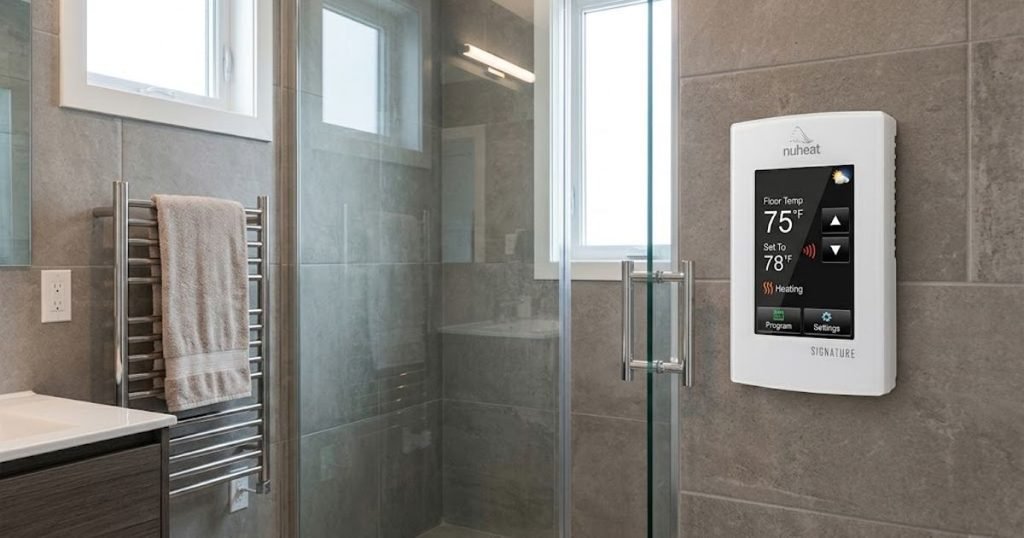
The Nuheat Signature AC0055 combines a 3.5-inch color touchscreen display with full Wi-Fi network capabilities. It offers local menu control directly on the wall alongside remote access through dedicated iOS and Android mobile apps.
- 3.5″ Color Touchscreen + Wi-Fi
- Remote App & Voice Control
- Live Weather Updates
- Dual Voltage (120/240V)
- Built-In Class A GFCI
- Premium Dual-Control Model
The display shows current outdoor weather conditions alongside your floor heating status. The Signature includes energy monitoring, 7-day programming schedules, and temperature limit features designed to protect delicate floor coverings like engineered wood or laminate. Operating on 120V/240V circuits up to a 15A resistive load, it incorporates a Class A GFCI protection circuit and comes backed by nVent’s 3-year warranty.
- Pros:
- Combines direct touchscreen adjustments on the wall with full mobile app control.
- Displays outdoor weather and forecasts directly on the home screen.
- Comprehensive energy usage metrics help monitor operational costs.
- Multi-voltage flexibility (120V/240V) fits standard radiant heating cable layouts.
- Cons:
- Higher purchase price compared to non-Wi-Fi options.
- Touchscreen interface adds physical size compared to screenless smart controllers.
- Who should buy it: Homeowners who want a full-featured touchscreen control on their wall while retaining the flexibility to manage schedules remotely over Wi-Fi.

4. Nuheat nVent Element (AC0057)
Non-Programmable Floor Heating Thermostat
The Nuheat Element AC0057 is designed for simplicity, serving spaces that do not require automatic schedule changes or app connectivity. It operates via simple manual up/down controls and an intuitive physical power toggle, making it an ideal choice for quick manual adjustments.
- Manual Up/Down Controls
- Non-Programmable Simplicity
- Dual Voltage (120/240V)
- Class A GFCI Protection
- Direct Sensor Feedback
- Simple On/Off Operation
- Set-And-Forget Manual Control
Despite its simple user interface, the Element retains key built-in safety features found across the Nuheat family: dual-voltage support (120V/240V), a 15A max resistive load rating, and built-in Class A GFCI protection. It supports direct floor temperature sensing to maintain consistent warm floors without complex setup menus or mobile app configurations.
- Pros:
- Simple operation with no complex menus, Wi-Fi pairing, or programming steps.
- Lower purchase price compared to touchscreen and smart models.
- Built-in Class A GFCI protection ensures electrical code safety compliance.
- High operational reliability with fewer software steps or connectivity variables.
- Cons:
- No setback programming running it continuously at high temperatures can raise utility bills.
- No remote connectivity or smart home platform compatibility.
- Who should buy it: Ideal for guest bathrooms, rental units, basement additions, or senior homeowners who prefer straightforward up/down temperature control.
READ MORE: Best Energy Star Smart Thermostats: Reviews, Comparison, and Buying Guide

Nuheat Thermostat Comparison Table
| Feature | Nuheat Home (AC0056) | Nuheat Conductor (UWG5-4999-NV) | Nuheat Signature (AC0055) | Nuheat Element (AC0057) |
| Thermostat Type | Programmable Touchscreen | Smart Wi-Fi / Bluetooth | Smart Wi-Fi Touchscreen | Non-Programmable Manual |
| Wi-Fi Connected | No | Yes | Yes | No |
| Bluetooth Pairing | No | Yes | No | No |
| Smartphone App | No | Yes (iOS/Android) | Yes (iOS/Android) | No |
| Display Type | 3.5″ Color Touchscreen | Backlit Digital Screen | 3.5″ Color Touchscreen | Digital LCD Screen |
| Floor Sensing | Yes | Yes | Yes | Yes |
| Ambient Sensing | Yes | Yes | Yes | Yes |
| Smart Home Integrations | None | Apple Home, Alexa, Google, IFTTT | Alexa, Google, IFTTT | None |
| Energy Monitoring | Yes | Yes (via App) | Yes | No |
| GFCI Protection | Class A (5mA) | Class A (5mA) | Class A (5mA) | Class A (5mA) |
| Voltage Support | 120V / 240V | 120V / 208V / 240V | 120V / 240V | 120V / 240V |
| Maximum Load | 15A Resistive | 15A Resistive | 15A Resistive | 15A Resistive |
| Warranty | 3-Year Limited | 3-Year Limited | 3-Year Limited | 3-Year Limited |
| Best For | Local scheduling without Wi-Fi | Smart home ecosystems | Premium touchscreen + app | Direct manual control |
Nuheat Home vs Conductor vs Signature vs Element
Best for Simplicity
The Nuheat Element is the clear leader for straightforward operation. It omits complex scheduling, network connectivity, and setup menus in favor of simple up/down controls. It delivers reliable underfloor heat without requiring software updates or smart home setup.
Best for Smart-Home Control
The Nuheat Conductor offers the broadest integration for modern connected homes. Featuring both Bluetooth for quick network pairing and native support for Apple Home, Amazon Alexa, Google Home, and IFTTT, it integrates cleanly into automated smart home routines and voice-activated setups.
Best Touchscreen Experience
The Nuheat Signature provides a premium interface with its vibrant 3.5-inch color touchscreen. It displays setpoints, real-time energy usage, and live outdoor weather conditions directly on the wall unit while maintaining mobile connectivity via the smartphone app.
Best for Energy Scheduling
The Nuheat Home offers structured energy management for households that do not require Wi-Fi access. Its 7-day program options allow you to reduce heat output during work hours or overnight, lowering utility costs through local, on-device programming.
Best for Homeowners Who Don’t Need Wi-Fi
If you want automated heating schedules without connecting another device to your wireless network, the Nuheat Home strikes an ideal balance. It offers full 7-day custom scheduling via an easy-to-read touchscreen without relying on app accounts or internet connectivity.
Best Overall Value
For most modern homeowners, the Nuheat Conductor delivers the best balance of price and features. It provides remote mobile control, smart home integration, dual-voltage support, and full floor-sensing capabilities at a competitive price point.
READ MORE: Step-by-Step DIY Smart Thermostat Installation Guide
Which Nuheat Thermostat Is Best for You?
- Choose the Nuheat Home if… You want to establish automated heating schedules on an easy-to-use touchscreen interface without managing a Wi-Fi connection or smart app.
- Choose the Nuheat Conductor if… You rely heavily on smart ecosystems like Apple Home, Alexa, or Google Assistant, and want your floor heat integrated into whole-home automation routines.
- Choose the Nuheat Signature if… You prefer a high-resolution touchscreen on the wall while retaining the ability to adjust settings remotely from your phone.
- Choose the Nuheat Element if… You need simple, reliable manual control for a guest bathroom, rental property, or secondary space where programming is unnecessary.
- Primary Bathroom Remodel: A Signature or Conductor lets you pre-warm tile floors 30 minutes before your morning alarm rings, keeping heating output minimal when the room is unused.
- Vacation Cabin or Second Home: The Conductor allows you to monitor floor temperatures remotely and start warming the space hours before you arrive, protecting against freeze risks during extreme weather.
- Rental Property or Guest Suite: The Element prevents visitors from accidentally altering complex heating programs or misconfiguring network connections, ensuring simple operation.
- Replacing an Older Nuheat Controller: The Home or Signature units fit standard electrical gang boxes, using your existing 10k floor sensor probe without requiring new wire runs beneath the tile.
Nuheat Thermostat Installation
Installing line-voltage electrical equipment carries inherent risk. Always turn off main electrical panel breakers before working on electrical boxes. All wiring should follow National Electrical Code (NEC) standards and local building regulations. Consult a licensed electrician if you are unfamiliar with line-voltage wiring procedures.
- Safety Isolation: Switch off power to the radiant floor circuit at the main breaker panel. Verify the circuit is fully de-energized using a reliable non-contact voltage tester.
- Back-Box Preparation: Secure a standard single-gang deep electrical box (or 2×4 junction box with a mud ring). Deep junction boxes provide necessary clearance for line-voltage wire nuts and the thermostat housing.
- Verify Supply Voltage: Use a multimeter to confirm whether line voltage supply is 120V or 240V, matching line conductors to line terminals on your controller accordingly.
- Wire Connections:
- Connect main incoming hot/neutral power wires to the Line terminals on the back of the thermostat.
- Connect cold leads running from underfloor heating cables to the Load terminals.
- Attach copper ground leads to the electrical box ground screw or grounding wire nut.
- Sensor Installation: Insert stripped leads of the embedded 10k ohm floor sensor wire into low-voltage Sensor terminals on the thermostat block. (Note: Sensor leads carry non-hazardous low voltage and must be kept separate from high-voltage supply lines inside the box).
- Mounting: Carefully fold line-voltage conductors into the back of the box. Secure the thermostat base housing to the box using the provided mounting screws, taking care not to pinch internal wires.
- System Test: Restore power at the breaker panel. Perform a built-in GFCI safety test via the front control panel before setting your daily schedule or pairing network settings.
READ MORE: Ecobee vs Honeywell vs Nest: Which Smart Thermostat Is Best?
How to Program a Nuheat Thermostat
Electric radiant underfloor heating operates on thermal mass. Unlike forced-air furnaces that warm room air within minutes, tile and concrete mass require 30 to 90 minutes to reach target temperatures. Your programming schedule should account for this warm-up window.
Recommended Heating Schedule Example
- Morning Comfort (06:00 AM – 08:00 AM): Set to 82°F (28°C). Set the program timer to turn on 45 minutes before you wake up so the tile reaches full temperature by the time you enter the room.
- Daytime Setback (08:00 AM – 05:00 PM): Set back to 70°F (21°C) or turn heating off while the home is unoccupied.
- Evening Comfort (05:00 PM – 10:00 PM): Set to 82°F (28°C) for comfortable floor warmth during evening hours.
- Overnight Setback (10:00 PM – 06:00 AM): Set back to 68°F (20°C) to conserve energy while sleeping.
Nuheat Thermostat Troubleshooting
Nuheat Thermostat is Blank
- Tripped Circuit Breaker: Check the main breaker panel to verify the branch circuit breaker has not tripped under load.
- Active GFCI Trip: Check if the built-in GFCI safety switch on the side or face of the unit has tripped. Press the reset button on the device to clear the fault.
- Loose Wire Connections: Turn off power at the breaker panel, remove the faceplate, and verify line-voltage connections are securely fastened inside wire nuts.
- Line Voltage Mismatch: Confirm that supply lines deliver adequate power (120V or 240V) to line terminals using a digital multimeter.
Nuheat Thermostat is Not Heating
- Low Setpoint: Verify current floor temperature is below your selected setpoint target.
- Open Sensor Circuit: If your sensor wire is cut or severed, the thermostat will lock out heating cycles as a safety measure. Check sensor resistance using a multimeter set to ohms; a healthy Nuheat sensor should read roughly 10k ohms at room temperature (77°F / 25°C).
- Schedule Setback Active: Check whether an active program setback is holding setpoint temperatures low during off-peak hours.
- Faulty Relay: If the heating indicator light shows active power delivery but heating cables remain cold, use a multimeter to check for voltage across the load terminals.
Nuheat Thermostat Shows GFCI Fault
- Moisture in Floor Assembly: Water or damp thinset around heating cable splices can trigger a ground fault leakage (>5mA), tripping the built-in Class A GFCI.
- Damaged Cable Sheathing: A knick in the heating cable caused during tile installation can create a current leak to ground.
- Troubleshooting Steps: Disconnect heating cable cold leads from load terminals and test wire insulation resistance using a megohmmeter (megger). If a ground fault persists, consult a qualified electrician or tile repair specialist to locate and repair underfloor cable damage.
Wi-Fi Connectivity Issues
- Band Mismatch: Nuheat Wi-Fi models require a 2.4 GHz wireless network. If your router combines 2.4 GHz and 5 GHz SSIDs under a single network name, temporarily split the bands in your router settings during setup.
- Weak Signal Strength: Check signal strength at the wall location. Thick tile, metallic mesh backer, or plumbing stacks can weaken Wi-Fi reception behind wall assemblies.
Nuheat Thermostat Compatibility
Nuheat controllers are engineered for electric radiant floor heating systems and run on line-voltage power circuits:
- System Compatibility: Designed for electric radiant floor cable, mat, and mesh systems (including Nuheat Cable, Mat, and Mesh systems).
- Third-Party Floor Cables: Compatible with third-party line-voltage electric heating cables that use a standard 10k ohm floor sensor.
- Incompatible Systems: Not compatible with low-voltage (24V) central HVAC systems (furnaces, heat pumps, central AC) or hydronic (hot water) radiant tubing networks.
Nuheat Thermostat Cost
When planning a radiant floor heating upgrade, factor in product list pricing alongside potential professional installation costs:
- Thermostat Purchase Prices:
- Nuheat Element (AC0057): ~$180 – $220
- Nuheat Home (AC0056): ~$280 list price
- Nuheat Conductor (UWG5-4999-NV): ~$290 – $330
- Nuheat Signature (AC0055): ~$360 list price
- Electrical Labor: Hiring a licensed electrician to run dedicated line-voltage circuits or swap wall controllers typically costs $150 to $350, depending on local market rates and existing junction box conditions.
Pros and Cons of Nuheat Thermostats
Pros
- Dedicated Electric Floor Control: Built specifically to manage underfloor heating cables, preventing overshoot and maintaining consistent floor temperatures.
- Integrated GFCI Safety: Built-in Class A GFCI protection meets national electrical safety codes without requiring expensive GFCI breakers at the main panel.
- Dual-Voltage Operation: Auto-sensing 120V/240V support simplifies stock selection and installation across different circuit configurations.
- Comprehensive Model Range: Options span simple manual controls (Element), touchscreen units (Home), and fully connected smart devices (Conductor/Signature).
Cons
- Higher Initial Cost: Premium materials and built-in GFCI safety features raise purchase prices compared to basic low-voltage HVAC thermostats.
- Specific System Scope: Line-voltage controllers cannot operate central forced-air heating or air conditioning equipment.
Is a Nuheat Thermostat Worth It?
Investing in a dedicated Nuheat floor thermostat is worth it for any electric underfloor radiant heating installation. Specialized floor-sensing technology prevents cold spots, protects floor coverings from heat damage, and avoids energy waste caused by running high-wattage heating elements longer than necessary.
For smaller guest baths or secondary spaces, non-programmable units like the Element provide cost-effective manual control. For primary bathrooms or main living areas, upgrading to a programmable model like the Home or a smart controller like the Conductor pays off over time through lower utility bills and automated daily comfort schedules.
Frequently Asked
Is a Nuheat thermostat worth it?
Yes. Nuheat controllers use direct floor sensing to manage line-voltage radiant heating cables safely and efficiently. Their built-in GFCI protection, dual-voltage support, and programmable scheduling options maintain floor warmth while preventing wasted energy.
Can I replace my Nuheat thermostat with a smart thermostat?
You can replace an older Nuheat controller with a smart model like the Nuheat Conductor or Signature provided the existing setup uses line-voltage power and a standard 10k ohm floor sensor. Standard low-voltage (24V) smart thermostats (like conventional Nest or Ecobee models) cannot control line-voltage electric radiant floor cables directly.
Why is my Nuheat thermostat not heating?
Common causes include setpoint targets below real-time floor temperatures, a tripped built-in GFCI safety switch, an active setback program schedule, or an open sensor wire circuit. Verify floor sensor probe resistance using a digital multimeter set to ohms; a healthy sensor should measure approximately 10k ohms at 77°F (25°C).
How do I reset a Nuheat thermostat?
Resetting procedures vary by model. For touchscreen controllers like the Home and Signature, open the Settings menu on the display, navigate to System Setup, and select Factory Reset. For manual or connected models like the Element or Conductor, press and hold the GFCI test button or consult your product manual for model-specific pinhole button combinations.
How much does it cost to replace a Nuheat thermostat?
Replacement unit costs range from $180 to $360 depending on whether you select a manual, programmable touchscreen, or smart Wi-Fi model. If you hire a licensed electrician to perform the installation, expect to pay an additional $150 to $350 in labor fees.
Final Verdict
Choosing the right Nuheat controller comes down to balancing your daily schedule, home tech preferences, and budget:
- Nuheat Element: The right choice if you want simple, set-and-forget manual temperature adjustments without managing app accounts or network pairing.
- Nuheat Home: Delivers high value if you want structured 7-day heating schedules on an intuitive color touchscreen without connecting to home Wi-Fi.
- Nuheat Conductor: The best option for modern smart homes, providing mobile app control, voice assistant integration (Alexa, Google, Apple Home), and flexible multi-sensor modes.
- Nuheat Signature: Ideal if you want a premium touchscreen wall interface paired with remote mobile app connectivity and live weather tracking.
Verify your home’s circuit voltage and total heating cable amperage load before making a purchase. Matching the right control features to your daily lifestyle ensures comfortable warm floors and reliable, long-term system performance.

