Keeping a home comfortable in the United States has become a bit of a balancing act. With fluctuating energy prices and the unpredictable weather ranging from scorching summer heatwaves to sudden deep freezes homeowners are looking for ways to stay cozy without draining their bank accounts.
Enter Energy Star smart thermostats. These aren’t just fancy gadgets with glowing screens; they are the command centers of modern, efficient homes. For many USA homeowners, switching to an energy-efficient thermostat is the single most effective “low-effort, high-reward” upgrade you can make.
In this guide, we’ll explore the best Energy Star smart thermostats on the market, break down why they matter, and help you find the perfect model to keep your home perfectly tempered while putting money back in your pocket. Lets deep dive into “Best Energy Star Smart Thermostats: Reviews, Comparison, and Buying Guide”
READ MORE: Best Honeywell Thermostat Models (2026): Buyer’s Guide & Comparison
What Is an Energy Star Smart Thermostat?
If you’ve ever shopped for a refrigerator or a washing machine, you’ve seen the little blue “Energy Star” logo. But what does it actually mean when it’s slapped onto a Wi-Fi thermostat?
The Energy Star Label Explained
The Energy Star program is run by the U.S. Environmental Protection Agency (EPA). When a smart thermostat carries this label, it means it has been independently certified to save energy. Unlike “regular” smart devices that might just look cool, an Energy Star certified thermostat has been tested using real-world data to prove it reduces HVAC (Heating, Ventilation, and Air Conditioning) runtime.
How Smart Thermostats Work
A traditional thermostat is a simple switch. You turn it up; the heat comes on. A programmable smart thermostat, however, uses a combination of Wi-Fi connectivity, sensors, and algorithms to manage your home’s climate.
- Connectivity: You can control it from your phone, whether you’re on the couch or in another time zone.
- Learning: The best models “learn” your schedule. If you leave for work every day at 8:00 AM, the thermostat eventually figures that out and lowers the heat automatically.
- Automation: They use “geofencing” (tracking your phone’s location) to know when you’re heading home, so the house is warm by the time you walk through the door.
Smart vs. Regular Thermostats
- Regular/Manual: You have to remember to change the temperature. Most people forget, leading to wasted energy when the house is empty.
- Programmable (Old School): You set a schedule manually. It’s better, but it doesn’t adapt if your plans change.
- Smart: It adapts in real-time, monitors the weather outside, and provides reports on your energy usage.
READ MORE: Sensi Smart Thermostat 2026 Review & Comparison
Why Homeowners Should Consider Energy Star Smart Thermostats
If you are still using a “twist-dial” or a basic push-button thermostat, you are essentially leaving money on the table. Here is why smart thermostats for homeowners have become the standard in 2026:
- Significant Energy Savings: On average, Energy Star certified models save homeowners about 8% on heating and cooling costs. In a large house, that adds up to hundreds of dollars a year.
- Remote Access: Ever left for vacation and wondered if you left the AC on 68°F? With a Wi-Fi thermostat, you can check and adjust it from your smartphone.
- Unmatched Comfort: Sensors can detect which rooms are actually being used. No more freezing in the bedroom while the living room is boiling.
- Utility Rebates: Many utility companies in the USA offer $50 to $100 rebates just for installing an Energy Star smart thermostat. In some cases, the thermostat ends up being nearly free.
- Smart Home Integration: They work with Alexa, Google Home, and Apple HomeKit, allowing you to change the temperature with just your voice.
How to Choose the Right Energy Star Smart Thermostat
Before you hit “Buy Now,” there are a few technical and practical things you need to consider. Not every thermostat works in every home.
1. HVAC System Compatibility
This is the big one. Most modern smart thermostats require a C-wire (Common wire) to provide constant power for the Wi-Fi and display. If you have an older home, you might not have one. Look for models that include a “Power Extender Kit” or are specifically designed for homes without a C-wire (like certain Nest or Sensi models).
2. Ease of Use and App Control
A smart thermostat is only helpful if you actually use the app. Look for an interface that feels intuitive. Does it show your current savings? Is it easy to set a “Vacation Mode”?
3. Geofencing and Sensors
- Geofencing: Uses your phone’s GPS to trigger “Home” or “Away” modes.
- Remote Sensors: Small pods you place in other rooms to ensure the baby’s nursery or your home office stays at the right temperature, regardless of where the main thermostat is located.
4. Design and Aesthetics
Since this sits on your wall, you want it to look good. Options range from the high-tech glass of the Google Nest to the more traditional, familiar look of the Honeywell and Sensi models.
Buying Checklist for Homeowners:
- [ ] Check for a C-wire behind your current thermostat.
- [ ] Confirm compatibility with your voice assistant (Alexa, Siri, or Google).
- [ ] Research local utility rebates for Energy Star smart thermostats.
- [ ] Decide if you need extra room sensors.
- [ ] Set a budget (prices range from $60 to $280).
READ MORE: Best Programmable Thermostats (2026) | Top Rated Reviews
Best Energy Star Smart Thermostats Reviews
We’ve analyzed the top performers for 2026. These models represent the best in efficiency, reliability, and user-friendliness.
1. Google Nest Learning Thermostat (4th Gen)
The “gold standard” of the industry has been refined. The 4th Generation Nest is a powerhouse of automation. It doesn’t just wait for you to program it; it watches your habits and creates a schedule for you.
- Key Features: High-res mirrored display, “Dynamic Farsight” (shows info as you walk by), and AI-driven “Adaptive Eco” mode.
- Best For: Busy families who want the thermostat to handle everything automatically.
- Pros: Beautiful design; incredibly smart learning algorithm; Matter-enabled.
- Cons: One of the most expensive options; works best within the Google Home ecosystem.
Who Should Buy It: Homeowners who want the most advanced, “hands-off” experience possible.

- Nest’s smartest, most advanced thermostat yet, the Google Nest Learning Thermostat (4th gen) is a beautiful, brilliant w…
- Improved compatibility: It works with most 24V systems, including gas, electric, oil, forced air, heat pump, and radiant…
- Easy control in the Google Home app: Adjust on your phone from anywhere[1] or by using your voice with Alexa, Siri, or G…
2. ecobee Smart Thermostat Enhanced
ecobee has a loyal following for a reason: they include everything you need in the box. The “Enhanced” model is their mid-tier hero that punches way above its weight class.
- Key Features: Built-in radar for occupancy sensing; compatible with ecobee SmartSensors; works with almost every smart home platform.
- Best For: Homes with “hot or cold spots” that need remote sensors.
- Pros: Excellent app interface; very reliable Wi-Fi; superb privacy features.
- Cons: Design is a bit “plastic” compared to the Nest.
Who Should Buy It: Homeowners who prioritize precise comfort across multiple rooms.
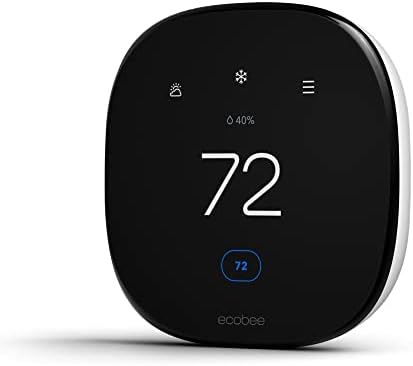
- Save up to 26% per year on heating and cooling costs Automatically adjusts the temperature when you’re away to never hea…
- Compatible with 90% of systems so check your system’s compatibility with our Compatibility Checker on the ecobee support…
- Built-in radar occupancy preheats or precools your home before you arrive so it’s the perfect temperature the moment you…
3. Honeywell Home RTH9585WF1004 Wi-Fi Smart Color Thermostat
Honeywell has been making thermostats for over a century. This model brings that reliability into the smart age with a large, easy-to-read color touchscreen.
- Key Features: Customizable screen colors to match your paint; simple 7-day programming; local weather display.
- Best For: Users who prefer a traditional “on-the-wall” control experience rather than just using an app.
- Pros: Very easy to read for seniors; no-nonsense reliability; widely supported by HVAC pros.
- Cons: Requires a C-wire (no exceptions); the app is a bit dated compared to ecobee or Nest.
Who Should Buy It: Those who want a smart device that still feels like a traditional thermostat.

- COMFORT COMES IN YOUR COLOR. Personalize your Wi-Fi Smart Color Programmable Thermostat to fit your décor.
- SAVE ENERGY AND GET REWARDED by checking with your energy provider about available rebates. Plus, eligible customers can…
- YOUR SCHEDULE. YOUR WAY. Flexible programming options for your schedule or utility company’s peak rate pricing.
READ MORE: Heatmiser Thermostat Review & U.S. Buying Guide (2026)
4. Google Nest Thermostat (GA02081-CA)
This is the “budget-friendly” sibling in the Nest family. It trades the “learning” features for a sleek, minimalist design and a lower price point.
- Key Features: Mirrored lens; touch-strip side controls; “Savings Finder” that suggests small tweaks to save more money.
- Best For: Renters or first-time buyers on a budget.
- Pros: Affordable; very stylish; easy to install.
- Cons: Doesn’t “learn”—you have to set the schedule; plastic body.
Who Should Buy It: Anyone who wants a brand-name Energy Star smart thermostat without the $250+ price tag.

- ENERGY STAR certified smart thermostat for home that helps you save energy and stay comfortable.Connectivity : Wi-Fi – 8…
- The Nest Thermostat is designed to work without a C wire in most homes, but for some systems, including heating only, co…
- Nest Thermostat turns itself down when you leave, so you don’t waste energy heating or cooling an empty home. Lock featu…
5. ecobee Smart Thermostat Essential (EB-STATE7-01)
Think of this as the “Lite” version of the ecobee. It focuses on the core mission: saving energy and staying connected.
- Key Features: Energy Star certified; Siri and Alexa compatibility; Power Extender Kit included for homes without a C-wire.
- Best For: Smaller homes or apartments.
- Pros: Includes the C-wire adapter; very fast response time; great value.
- Cons: Does not include a remote sensor in the box (must buy separately).
Who Should Buy It: Value-conscious shoppers who still want the high-quality ecobee app experience.

- Save up to 23% every year on heating and cooling costs, adjusts to your set schedule to save energy when you’re gone and…
- Compatible with 85% of systems, check your system’s compatibility with our online ecobee Compatibility Checker on the ec…
- Change your temperature by easily tapping the color touchscreen or using the ecobee app. Plus, free software upgrades en…
6. Sensi Smart Thermostat (ST55)
Emerson’s Sensi brand is the “pro’s choice.” It looks exactly like the thermostats we’ve had for 30 years, but it’s packed with smart tech.
- Key Features: Traditional button interface; high compatibility with older wiring; top-rated mobile app.
- Best For: Older homes with tricky wiring.
- Pros: Often doesn’t require a C-wire (on heat/cool systems); very easy for DIY installation.
- Cons: It’s not a “looker”—very basic aesthetic.
Who Should Buy It: The DIYer who wants an easy install and a familiar interface.

- PRIVACY PROTECTION*: Sensi won’t sell your personal information to third parties
- EASY DIY INSTALLATION: Use the built-in level and step-by-step app instructions for a quick installation. Works with HVA…
- SAVE ABOUT 23% ON HVAC ENERGY*: The ENERGY STAR-certified Sensi smart thermostat can help you save energy with features …
7. Amazon Smart Thermostat (S6ED3R)
Amazon entered the market with one goal: making the best Energy Star smart thermostat for under $80. Developed with Honeywell technology, it’s a powerhouse of value.
- Key Features: Deep Alexa integration; “Hunches” feature (Alexa guesses if you’re away); minimalist white design.
- Best For: Homes already full of Echo Dot and Alexa devices.
- Pros: Incredibly cheap; simple setup; Energy Star certified.
- Cons: Requires an Alexa-enabled device for voice control; no built-in speaker.
Who Should Buy It: The ultimate budget-seeker who wants a reliable, simple smart home upgrade.
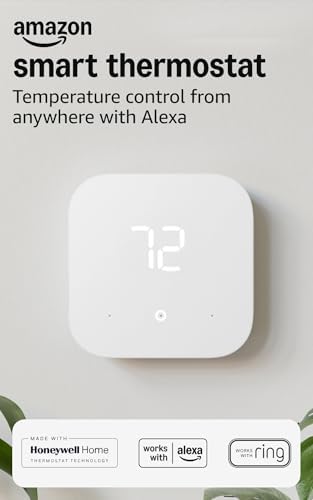
- Smart upgrade – Amazon Smart Thermostat is an easy way to switch from a traditional thermostat and help reduce energy us…
- Create comfort zones throughout your home by using select Echo devices or Amazon Smart Air Quality Monitor to automatica…
- Save money – After purchase, Amazon will send you an email with details about rebates that may be available from energy …
READ MORE: How to Test a Water Heater Thermostat — Easy DIY Guide
Best Energy Star Smart Thermostats Comparison Table:
| Product Name | Smart Features | Learning? | Energy Saving Tools | Voice Assistant | Ease of Install | Best For | Price Range |
| Nest Learning (4th Gen) | AI Scheduling | Yes | Adaptive Eco | Google/Alexa | Moderate | Hands-off users | $$$ |
| ecobee Enhanced | Radar Sensors | No | Smart Recovery | All (Siri/Alexa/etc) | Moderate | Multi-room comfort | $$ |
| Honeywell Color | Custom UI | No | Energy Reports | Alexa/Google | Professional/DIY | Seniors/Traditionalists | $$ |
| Nest Thermostat | Savings Finder | No | Home/Away Assist | Google/Alexa | Easy | Budget/Style | $ |
| ecobee Essential | Remote App | No | Pause on Open Door | All | Easy | Value/Reliability | $ |
| Sensi ST55 | Remote App | No | Usage History | Alexa/Google/HomeKit | Very Easy | DIYers/Older Homes | $ |
| Amazon Smart | Alexa Hunches | Yes (via Alexa) | Automatic Dimming | Alexa (required) | Easy | Budget/Alexa Users | $ |
Best Energy Star Smart Thermostat Picks by Homeowner Type
Still not sure which one to click? Let’s narrow it down based on your “vibe.”
- Best Overall: ecobee Smart Thermostat Enhanced. It strikes the perfect balance between high-end features, ease of use, and compatibility.
- Best for Easy Installation: Sensi Smart Thermostat (ST55). If you are terrified of wiring, the Sensi is your best friend. It’s designed to be a “drop-in” replacement.
- Best for Budget Buyers: Amazon Smart Thermostat. At its price point, the energy savings will pay for the device in less than a year.
- Best for Smart Home Users: Google Nest Learning Thermostat (4th Gen). Its Matter support means it will play nice with almost any future smart home tech you buy.
- Best for Advanced Comfort: ecobee Smart Thermostat Enhanced (with extra sensors). Use this if you have that one bedroom that is always freezing in the winter.
- Best for First-Time Buyers: Google Nest Thermostat. It’s simple, looks great, and does exactly what it needs to do without overwhelming you with settings.
READ MORE: Best OmniBreeze Tower Fan: 2026 Reviews, Comparison & Buyer Guide
How do smart thermostats save energy
It is important to manage expectations: simply buying a smart thermostat won’t cut your bill in half overnight. However, it will eliminate waste.
Why Scheduling Matters
Most energy waste happens when we heat or cool an empty house. If you are at work from 9 to 5, keeping the house at 72°F is essentially burning money. A programmable smart thermostat ensures that the temperature drifts to a more efficient level (say, 78°F in summer) while you’re out, and cools back down just before you arrive.
The Role of Automation
Many Energy Star models use “Time of Use” (TOU) pricing. If your utility company charges more for electricity during the afternoon, a smart thermostat can “pre-cool” your home in the morning when rates are lower, then cycle off during the expensive peak hours.
Factors That Affect Your Results:
- Insulation: A smart thermostat can’t fix a drafty window. Ensure your home is well-sealed for maximum efficiency.
- Weather: In extreme 100°F+ weather, your AC will run more regardless of the thermostat.
- User Habits: If you manually override the smart schedule every day, you’ll see fewer savings.
Energy star smart thermostats installation and Setup Tips
You don’t need to be an electrician to install most of these, but you do need to be careful.
- Check Compatibility First: Visit the manufacturer’s website (Nest, ecobee, etc.) and use their compatibility checker tool before you buy.
- Power Off! Go to your breaker box and flip the switch for your HVAC system. Safety first.
- Label Your Wires: Before you pull the old thermostat off, use the stickers provided in the box to label each wire (R, W, Y, G, C). Do not go by the color of the wire; go by the letters on the old terminal.
- The App is Your Guide: Most modern thermostats (especially Nest and ecobee) have a step-by-step video guide within their app that walks you through the physical installation.
- When to Call a Pro: If you see thick wires joined by wire nuts, or wires labeled 120V/240V, stop. You have a high-voltage system that requires a specific type of thermostat and likely a professional installer.
READ MORE: Ultra Quietest Heat Pump for Your Home: Review, Comparison & Cost
Common Mistakes to Avoid
Avoid these pitfalls to ensure your home energy savings journey starts smoothly:
- Ignoring the C-Wire: Don’t assume you have one. If you don’t, and you buy a model that requires it without an adapter, you’ll be making a return trip to the store.
- Bad Placement: Don’t install your thermostat in direct sunlight or right next to a drafty door. It will get a false reading and run your system too much or too little.
- Setting and Forgetting Too Much: While they are “smart,” it pays to check your energy reports once a month to see if you can tweak the schedule for even better savings.
- Buying Too Much Tech: If you live in a 900-square-foot apartment, you probably don’t need a $300 thermostat with 5 remote sensors.
Frequently Asked Questions (FAQ)
What is the best Energy Star smart thermostat for homeowners?
For most USA homeowners in 2026, the ecobee Smart Thermostat Enhanced is the best choice due to its balance of features and reliability. However, if you want a fully automated experience, the Google Nest Learning Thermostat is the top premium pick.
Are Energy Star smart thermostats worth it?
Yes. Between the direct energy savings (average 8% on HVAC costs) and the available utility rebates, most smart thermostats pay for themselves within 12 to 24 months. Plus, the convenience of phone control is a huge quality-of-life upgrade.
Do smart thermostats really save energy?
Yes, but they save the most energy by reducing “idle” time—heating or cooling the home when no one is there or when everyone is asleep. If you already manually manage your thermostat strictly, your savings might be smaller, but the automation makes it much easier to maintain those habits.
Which smart thermostat is easiest to install?
The Sensi Smart Thermostat (ST55) and the Google Nest Thermostat are widely considered the easiest for DIYers. Sensi, in particular, is designed to fit the footprint and wiring of older traditional thermostats perfectly.
How do I know if a smart thermostat will work with my HVAC system?
The best way is to pop the cover off your current thermostat and look at the wires. If you see low-voltage wires (like those for a door bell), it’s likely compatible. Use the “Compatibility Checker” on the manufacturer’s website to be 100% sure.
Conclusion
Upgrading to an Energy Star smart thermostat is one of the smartest moves a USA homeowner can make in 2026. Whether you choose the high-tech learning capabilities of the Google Nest, the sensor-driven comfort of the ecobee, or the budget-friendly simplicity of the Amazon Smart Thermostat, you are taking a major step toward a more efficient home.

