It happens every year temperatures drop overnight, you bump the thermostat up a few degrees, and… nothing. The display looks fine, maybe it even says “Heat On,” but your home feels just as cold 20 minutes later. If you’re a homeowner dealing with a Honeywell thermostat not turning on heat, you’re not alone.
Here’s the good news: most of the time, the thermostat itself isn’t broken. In fact, the majority of no-heat calls that HVAC technicians respond to in winter come down to simple, fixable issues dead batteries, a tripped breaker, a clogged filter, or a setting that got bumped accidentally.
This guide walks you through every likely cause, a step-by-step troubleshooting process, safe DIY fixes, and clear signs it’s time to pick up the phone and call a professional. Lets deep dive into “Honeywell Thermostat Not Turning On Heat? Causes, Fixes & Troubleshooting Guide”
READ MORE: Best ecobee Smart Thermostat Review: Essential vs Enhanced vs Premium
Why Your Honeywell Thermostat Is Not Turning On Heat
Before diving deep, here’s a fast summary of the most common culprits:
| Cause | Likely Fix |
| Wrong thermostat settings | Switch to Heat mode; raise setpoint |
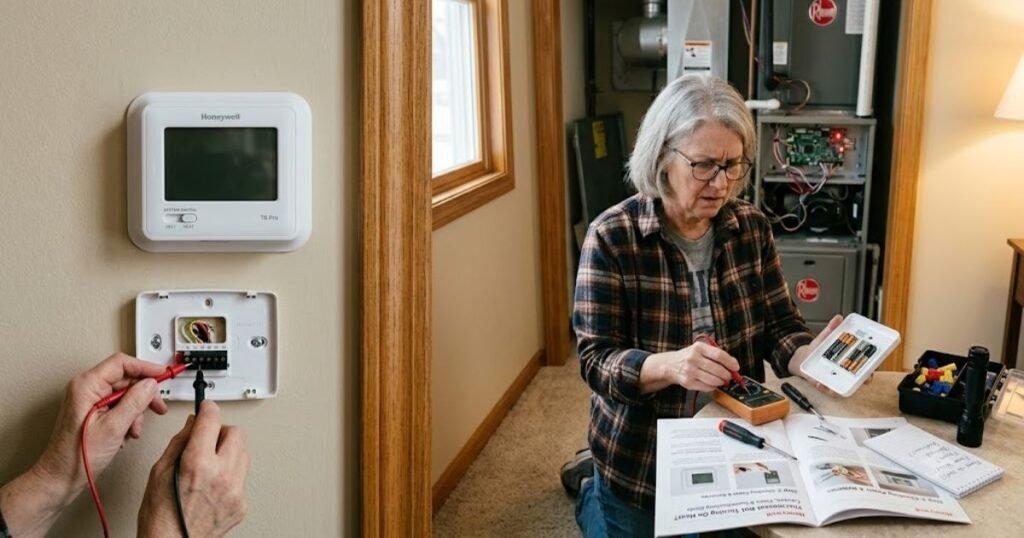
| Dead or weak batteries | Replace with fresh AA or AAA batteries |
| Tripped circuit breaker | Reset HVAC breaker in panel |
| Furnace power switch off | Flip switch near furnace back ON |
| Dirty air filter | Replace the filter; reset furnace |
| Wiring issue | Check terminal connections (power OFF first) |
| Heat delay / wait mode | Wait 5 minutes for protection timer |
| Faulty thermostat | Replace if all else checks out |
| HVAC safety lockout | Reset furnace; call pro if it repeats |
✅ Try This First — Quick Checklist
- [ ] Is the thermostat set to HEAT (not Cool or Off)?
- [ ] Is the setpoint at least 3°F above the current room temperature?
- [ ] Are the batteries fresh?
- [ ] Is the HVAC circuit breaker in the ON position?
- [ ] Is the power switch on or near the furnace ON?
- [ ] Has it been 5+ minutes since you changed the setting?
- [ ] Is the air filter clean and properly seated?
If you checked all of these and your Honeywell thermostat heat is still not kicking on, keep reading.
How Honeywell Thermostats Control Your Heating System
Think of your thermostat as the brain and your furnace as the muscle. The thermostat doesn’t actually create heat it just sends a signal to your heating system telling it when to start and stop.
When the room temperature drops below your setpoint, the thermostat sends a low-voltage electrical signal (usually 24 volts) through a wire connected to your furnace, heat pump, or boiler. That signal says, in essence, “Start heating.”
The type of heating system you have matters:
- Gas furnace — The thermostat triggers the ignition sequence. You may hear a click, then the burner lighting, then the blower fan starting.
- Electric furnace — Electric heating elements activate. The blower follows.
- Heat pump — Extracts heat from outside air (even in cold weather) and moves it indoors. In very cold conditions, a backup strip heater may kick in.
Key thermostat mode settings explained:
- Heat — System heats when temperature drops below setpoint
- Cool — System cools when temperature rises above setpoint
- Auto — Switches between heating and cooling automatically
- Emergency Heat — Bypasses the heat pump; uses backup electric heat only (heat pumps only)
- Fan: Auto — Fan runs only when heating or cooling is active
- Fan: On — Fan runs continuously (circulates air but doesn’t heat)
Understanding these modes helps you catch setting errors before assuming something is broken.
READ MORE: Is a Google Nest Thermostat Worth It? Review, Comparison & Buyer Guide
12 Reasons Your Honeywell Thermostat Is Not Turning On Heat
1. Thermostat Is Set Incorrectly
This is the most common reason, and there’s no shame in it especially if someone else in the household adjusted the settings.
Check three things:
- System mode: Make sure it’s on Heat, not Cool, Off, or Auto (some Auto settings don’t behave as expected with certain systems)
- Temperature setpoint: The target temperature must be noticeably higher than the current room temperature at least 3°F above. If the room is 68°F and you set it to 68°F, nothing will happen
- Schedule override: If you have a programmable or smart thermostat, a saved schedule may be overriding your manual settings. Look for a “Hold” or “Override” option to lock in your preferred temperature
DIY Fix: Press the System button to cycle to Heat mode. Use the up arrow to raise the setpoint 5 degrees above the current reading. Wait 5 minutes.
2. Thermostat Batteries Are Dead or Weak
Battery-powered Honeywell thermostats rely entirely on their batteries to function. Even “smart” models sometimes use batteries as backup. Weak batteries don’t always cause a blank screen, they can cause erratic behavior, including the thermostat failing to send a proper signal to your furnace.
Symptoms of dying batteries:
- Display dims or flickers
- Low battery indicator appears
- Settings reset unexpectedly
- Thermostat is unresponsive or sluggish
How to replace them:
- Remove the thermostat body from the wall plate (usually snaps off)
- Pop out the old batteries (typically AA or AAA)
- Insert fresh alkaline batteries, matching polarity
- Reattach and allow 1–2 minutes for restart
Expected battery life: 8–12 months under normal use. Replace them every fall as part of your seasonal prep.
3. “Heat On” Flashing or Wait Mode
If your Honeywell thermostat display shows “Heat On” flashing (rather than solid), that’s not a malfunction it’s a built-in protection feature.
Most modern thermostats include a short-cycle delay, usually 3–5 minutes, that prevents the compressor or furnace from restarting too quickly after shutting off. This protects equipment from pressure and voltage damage.
What to do: Simply wait. If the flashing stops within 5 minutes and the furnace kicks on, you’re fine. If the flashing continues indefinitely beyond 5 minutes, there may be an underlying issue move on to the next checks.
4. Tripped HVAC Breaker
Your furnace, air handler, or heat pump is connected to a dedicated circuit breaker. If that breaker trips, the heating system loses power entirely even though your thermostat may still display normally (if it has its own battery or C-wire power).
How to safely reset:
- Go to your home’s electrical panel
- Look for a breaker labeled Furnace, Air Handler, HVAC, or Heat
- If it’s in the middle position (tripped), flip it fully to OFF, then back to ON
- Wait 2–3 minutes, then check if heat kicks on
Signs the breaker is failing: If the breaker trips again within a few hours without explanation, do not keep resetting it. A repeatedly tripping breaker can indicate a wiring fault, motor failure, or overloaded circuit. Call an electrician or HVAC technician.
READ MORE: Best Energy Star Smart Thermostats: Reviews, Comparison, and Buying Guide
5. Furnace Power Switch Is Off
There’s a wall switch near most gas and electric furnaces that looks exactly like a regular light switch. Many homeowners accidentally flip this off while working in the basement, utility closet, or attic. It also gets bumped during cleaning or moving items.
Where to find it: Check within 6 feet of the furnace or air handler often on the wall or on a junction box mounted to the unit itself.
Simply flip it back to ON and wait a few minutes for the system to restart.
6. Dirty Furnace Filter Triggered Safety Shutdown
A severely clogged air filter does more than reduce efficiency; it can cause your furnace to overheat and shut itself down via a safety switch called the limit switch. This is one of the most common reasons homeowners find their Honeywell thermostat not sending heat even though it appears to be calling for it.
Why airflow matters: Furnaces need a steady flow of air to stay at a safe operating temperature. A blocked filter traps heat inside the unit, causing temperatures to spike and triggering automatic shutdown.
Recommended filter replacement intervals:
| Filter Type | Replacement Frequency |
| Fiberglass (1″) | Every 30 days |
| Pleated (1″) | Every 60–90 days |
| Thick media (4–5″) | Every 6–12 months |
| HEPA / High-MERV | Per manufacturer guidance |
Homeowner Tip: Write the replacement date on the edge of the filter with a marker when you install it. Check it monthly during heating and cooling season. A clean filter is the single easiest way to prevent furnace problems.
After replacing the filter, turn the furnace off at the switch for 30 seconds, then back on to reset any tripped limit switch.
7. Thermostat Lost Power (C-Wire Issue)
Smart and Wi-Fi-enabled Honeywell thermostats (like the T6 Pro, T9, or older RTH series) require continuous power from a common wire (C-wire) to stay connected and function properly. Without a C-wire, some models use a “power stealing” method that can cause intermittent issues with heating systems.
Symptoms of a missing or failed C-wire:
- Thermostat frequently disconnects from Wi-Fi
- Blank or flickering screen
- Heating works sometimes but not consistently
- Low battery warnings even with fresh batteries
If your thermostat doesn’t have a C-wire connected, a licensed HVAC technician can run one, or you can use a C-wire adapter kit.
8. Incorrect Wiring After Installation
Wiring errors are especially common after a DIY thermostat installation. Each wire terminal has a specific function, and connecting wires to the wrong terminals can prevent heating entirely.
Key terminals on a Honeywell thermostat:
| Terminal | Function |
| R / Rh | 24V power for heating |
| Rc | 24V power for cooling |
| W / W1 | Heating call (to furnace) |
| C | Common wire (return for 24V circuit) |
| Y | Cooling call (to compressor) |
| G | Fan control |
Common mistakes include swapping Rh and Rc, leaving the W terminal loose, or not connecting the C-wire.
⚠️ Important: Never touch or adjust thermostat wiring without first switching off the HVAC system at the breaker. Low-voltage wiring (24V) is generally safe, but a short circuit can damage the furnace control board, a repair that costs hundreds of dollars.
READ MORE: Sensi Smart Thermostat Review & Comparison
9. Furnace Ignition or Pilot Problems
If the thermostat is calling for heat but the furnace isn’t responding, the issue may be with ignition.
Modern furnaces use:
- Hot surface igniter (HSI) — A glowing element that lights the burner. You may hear clicking but no ignition.
- Intermittent pilot — A spark ignites a pilot, which lights the main burner.
- Standing pilot — Older systems have a continuously burning pilot light that may go out.
What homeowners can safely inspect:
- On older systems with a standing pilot: look through the furnace inspection window. If there’s no blue flame, the pilot may be out. Relight following the label instructions on the furnace door.
- Listen for the ignition sequence: a soft click, a whomp, then the blower starting. If you hear clicking but no flame, stop here.
When to stop: If you smell gas at any point, do not attempt to relight anything. Leave the house and call your gas utility company immediately.
10. Furnace Limit Switch Triggered
The high-limit switch monitors the temperature inside the furnace heat exchanger. If temperatures get too high usually due to a clogged filter or blocked vents the limit switch trips and shuts everything down to prevent damage or fire.
Symptoms:
- Furnace blower runs continuously but no heat
- Furnace starts briefly, then shuts off
- Thermostat says “Heat On” but no warm air comes out
The fix often starts with the filter (see #6). If you replace the filter and the limit switch keeps tripping, a technician needs to inspect the heat exchanger for cracks or the limit switch itself for failure.
11. Thermostat Sensor Is Reading Incorrectly
Your thermostat uses a built-in temperature sensor to determine when to call for heat. If that sensor gets a false reading, it won’t trigger heating even when the room is cold.
Common causes of incorrect readings:
- Direct sunlight hitting the thermostat during the day, making it “think” the room is warmer
- Nearby supply vents blowing warm air directly onto the thermostat
- Drafts from windows or doors cooling the sensor artificially, causing the system to over-heat
- Location in a closed-off room that doesn’t represent the rest of the home
If the thermostat is poorly located, relocation by an HVAC technician may be the long-term fix.
12. Thermostat Hardware Failure
After ruling out all other causes, the thermostat itself may be faulty. Hardware failures are not common, but they do happen especially in units that are 10+ years old, have experienced power surges, or have water damage.
Signs the thermostat should be replaced:
- Display is permanently blank even with fresh batteries and power confirmed
- Buttons or touchscreen are unresponsive
- Wiring connections are correct, power is confirmed, but furnace never receives a signal
- The thermostat keeps losing its settings or date/time
- Diagnostic testing shows no 24V signal sent when heat is called
Replacement thermostats from Honeywell range from basic non-programmable units (~$25) to full smart models (~$150–250).
READ MORE: Heatmiser Thermostat Review & U.S. Buying Guide
Honeywell Thermostat Troubleshooting Flowchart
Use this step-by-step decision tree to narrow down your issue:
1. Is the thermostat screen ON?
├── NO → Replace batteries / check breaker / check power switch
└── YES → Continue
2. Is the system set to HEAT mode?
├── NO → Change system mode to HEAT
└── YES → Continue
3. Is the setpoint 3°F+ above current room temp?
├── NO → Raise setpoint
└── YES → Continue
4. Is “Heat On” flashing?
├── YES → Wait 5 minutes (protection delay)
└── NO → Continue
5. Is the HVAC breaker ON?
├── NO → Reset breaker
└── YES → Continue
6. Is the furnace power switch ON?
├── NO → Flip switch to ON
└── YES → Continue
7. Is the air filter clean?
├── NO → Replace filter, reset furnace
└── YES → Continue
8. Do you hear furnace attempting to ignite?
├── NO → Check igniter / pilot / call technician
└── YES → Continue (intermittent shutdown — check limit switch)
9. Still no heat? → Reset thermostat (see next section)
10. Reset didn’t work? → Call HVAC professional
Honeywell Thermostat Reset Guide (By Model Type)
Note: Reset methods vary by model. Always confirm your exact model number on the back of the thermostat before resetting.
Smart/Wi-Fi Models (T9, T10 Pro, T6 Pro)
- Press the Menu button
- Scroll to Reset
- Choose Factory Reset or Restore Defaults
- Follow on-screen confirmation prompts
Programmable Models (RTH7560E, RTH6580WF)
- Remove thermostat from wall plate
- Remove batteries
- Wait 30 seconds
- Reinsert batteries, reinstall on plate
- Reprogram schedule if needed
Battery-Powered Non-Programmable Models
- Remove batteries for 30 seconds
- Reinsert and power on
- Adjust settings as needed
Touchscreen Models (Lyric T5, T6)
- Tap Menu (gear icon)
- Select Reset
- Tap Factory Reset
- Confirm with Yes
READ MORE: Best Programmable Thermostats | Top Rated Reviews
Honeywell Thermostat Says Heat On But Furnace Is Not Running
This is one of the most frustrating situations: your Honeywell thermostat says heat is on, but no warm air comes out.
Here’s what’s likely happening: the thermostat is successfully sending a signal to the furnace, but something inside the heating system is preventing it from running.
Possible causes when the signal is sent but heat isn’t produced:
- Furnace control board failure — The board receives the thermostat signal but can’t process it properly
- Safety switches open — Limit switch, pressure switch, or flame rollout switch has tripped
- Short cycling — Furnace starts, immediately overheats (usually filter-related), and shuts off before warm air reaches vents
- Gas supply issue — Gas valve is closed or gas supply is interrupted
- Draft/pressure switch — A blocked flue or failed inducer motor can trigger pressure switches that prevent ignition
Homeowner troubleshooting checklist for this situation:
- [ ] Replace the air filter
- [ ] Listen at the furnace — do you hear a click or hum when heat is called?
- [ ] Check that gas valve handle is parallel (open) to the gas pipe
- [ ] Look for error codes flashing on the furnace circuit board (count the flashes and reference your furnace manual)
- [ ] Check that flue pipes are not visibly blocked, disconnected, or damaged
- [ ] Call a technician if any safety switches have tripped and you cannot identify why
DIY Fixes Homeowners Can Safely Try
Safe to try at home:
- ✅ Replace thermostat batteries
- ✅ Reset the HVAC circuit breaker (once)
- ✅ Replace the furnace air filter
- ✅ Re-seat the thermostat on its wall plate
- ✅ Review and correct thermostat schedule settings
- ✅ Clear any furniture, curtains, or debris blocking supply and return vents
- ✅ Perform a thermostat reset (per model instructions above)
- ✅ Relight a standing pilot light (if no gas smell is present)
🚫 Do Not Attempt
- ❌ Gas valve adjustment or replacement
- ❌ Furnace control board repair or replacement
- ❌ Live wiring work inside the furnace or air handler
- ❌ Disassembling the furnace heat exchanger
- ❌ Anything involving a gas smell evacuate and call your gas company
Signs You Need an HVAC Professional
Don’t wait when you notice any of the following:
- Burning smell coming from vents or the furnace (could indicate electrical fault or cracked heat exchanger)
- Circuit breaker trips repeatedly after resetting
- No 24V signal at the furnace control board (requires a multimeter to test)
- Clicking with no ignition that persists after 3 attempts
- Furnace error codes that indicate board failure, pressure switch problems, or flame sensor issues
- Thermostat replacement doesn’t fix the problem — meaning the issue is in the system, not the thermostat
- Gas smell at any point — this is an emergency; leave the home and call your gas utility
Thermostat Repair Cost Guide (USA 2026)
Costs vary by region, system age, and labor rates. These are typical national ranges.
| Repair | Typical Cost (USA 2026) |
| Thermostat reset (DIY) | Free |
| Thermostat reset (service call) | $75–$150 |
| Thermostat replacement (basic) | $100–$250 (parts + labor) |
| Thermostat replacement (smart) | $200–$400 (parts + labor) |
| Wiring repair / correction | $100–$300 |
| Furnace filter replacement (DIY) | $10–$40 |
| Furnace tune-up / service call | $80–$200 |
| Igniter replacement | $150–$350 |
| Limit switch replacement | $100–$250 |
| Furnace control board repair | $300–$600 |
| Furnace control board replacement | $500–$1,500 |
Disclaimer: Costs vary significantly by geographic region, contractor, and system type. Always request multiple quotes for major repairs. Emergency after-hours service calls typically carry an additional surcharge of $50–$150.
How to Prevent Heating Problems in the Future
Seasonal maintenance checklist (Fall — before heating season):
- [ ] Replace furnace filter
- [ ] Test thermostat by calling for heat and confirming warm air
- [ ] Replace thermostat batteries
- [ ] Clear 2 feet of clearance around the furnace
- [ ] Check that all supply and return vents are open and unblocked
- [ ] Inspect the flue pipe for disconnections or visible damage
- [ ] Schedule annual HVAC inspection
Year-round habits:
- Filter schedule: Mark your calendar or set a phone reminder for filter changes every 1–3 months
- Battery replacement: Every fall, swap in fresh batteries don’t wait for the low battery warning
- Thermostat software updates: Smart Honeywell thermostats (Lyric, T-series) receive firmware updates via the app. Keep these current for bug fixes and performance improvements
- Annual HVAC inspection: A licensed technician can catch failing igniters, dirty burners, cracked heat exchangers, and refrigerant issues before they leave you without heat in January
- Keep records: Note your filter change dates, service visits, and any error codes. This information is valuable when diagnosing future problems
Final Takeaway
When your Honeywell thermostat isn’t turning on heat, take a breath it’s almost always fixable, and it’s rarely the thermostat itself that’s the core problem.
Start simple: check your settings, replace the batteries, confirm breakers and power switches, and look at the filter. These five steps alone resolve the majority of no-heat situations that homeowners call in every winter.
If those basics don’t do it, move to furnace-level checks listen for ignition attempts, look for error code flashes on the furnace board, and check for tripped safety switches.
Call a professional when safety systems keep triggering, when you smell gas, when the breaker won’t stay reset, or when you’ve tried everything and still can’t get heat. HVAC technicians diagnose these systems every day, and a one-time service call is far less expensive than going without heat for days or damaging an expensive system by guessing.
Stay warm.
Frequently Asked Questions
Why is my Honeywell thermostat on but not heating?
The most common reasons are incorrect settings (not in Heat mode, or setpoint too low), dead batteries, a tripped circuit breaker, or a dirty furnace filter that triggered a safety shutdown. Start by checking these basics before assuming the thermostat is broken.
Why does my Honeywell thermostat say heat on but no heat comes out?
This usually points to a tripped limit switch (often caused by a clogged filter), a failed igniter, a furnace control board issue, or a safety lockout. Replace the filter first, then listen for ignition sounds. If the furnace doesn’t attempt to start, the problem is inside the heating system, not the thermostat.
How do I reset my Honeywell thermostat for heat?
For most programmable models: remove the thermostat from the wall plate, pull out the batteries, wait 30 seconds, and reinsert them. For smart/touchscreen models (T6, T9, Lyric): go to Menu > Reset > Factory Reset. After any reset, set the system to Heat mode and raise the setpoint above the current room temperature, then wait 5 minutes.
Can low batteries stop a Honeywell thermostat from turning on heat?
Yes. Low or dead batteries are a surprisingly common cause of Honeywell thermostat heat not working. Even if the screen still shows something, weak batteries may not supply enough power for the thermostat to send a proper signal to the furnace.
Should I replace my thermostat if heat is not working?
Not necessarily and in most cases, replacing the thermostat prematurely won’t fix the problem. The thermostat is usually the last thing to blame. Work through the full checklist first: settings, batteries, breaker, power switch, filter, and furnace diagnostics. If all checks out and a confirmed test shows the thermostat is not sending a 24V signal when it should be, then replacement makes sense.

Pingback: What Is an HVAC C-Wire? Do You Need One? - Plumbing Guider