Stepping onto a cold tile floor in the middle of winter is a quick reminder of how much room temperature matters. Electric underfloor heating solves that problem by turning the entire floor into a gentle, radiant heat source. However, keeping that system efficient, comfortable, and safe requires a specialized control interface: a high-voltage radiant heating thermostat.
A Warmup thermostat is engineered specifically to manage electric underfloor and radiant heating systems. Unlike standard 24-volt central HVAC thermostats such as basic home units or standard configurations of Nest and ecobee, a Warmup floor heating thermostat directly switches high-voltage electrical current (typically 120V or 240V) supplied to heating cables or mats embedded in your floor.
Choosing the right controller determines whether your heated floors operate efficiently or consume excessive power. Whether you are adding a heated tile floor to a bathroom remodel, upgrading an older controller, or troubleshooting an existing system, understanding how these line-voltage controllers function ensures your radiant floor stays warm, safe, and cost-effective. Lets deep dive into “Warmup Thermostat Review: 7iE vs 6iE, Installation & Buying Guide”
READ MORE: Best Honeywell Thermostat Models: Buyer’s Guide & Comparison
What Is a Warmup Thermostat?
A Warmup thermostat is a wall-mounted control designed to regulate radiant heating most commonly electric underfloor heating cables or mats, and on some models, compatible baseboard or hydronic (water-based) systems. Instead of just reading room air temperature, many Warmup thermostats can also read the temperature of the floor itself using a dedicated sensor probe.
That’s the key functional difference from an HVAC thermostat:
- Air sensing measures the temperature of the room, similar to a standard thermostat.
- Floor sensing measures the temperature of the slab or subfloor using a probe embedded during installation.
- Combined sensing blends both readings, which is common in bathrooms and kitchens where floor comfort matters as much as room temperature.
Depending on the model, a Warmup thermostat may also include:
- Wi-Fi connectivity for remote/app control
- Smart scheduling and occupancy- or location-based automation
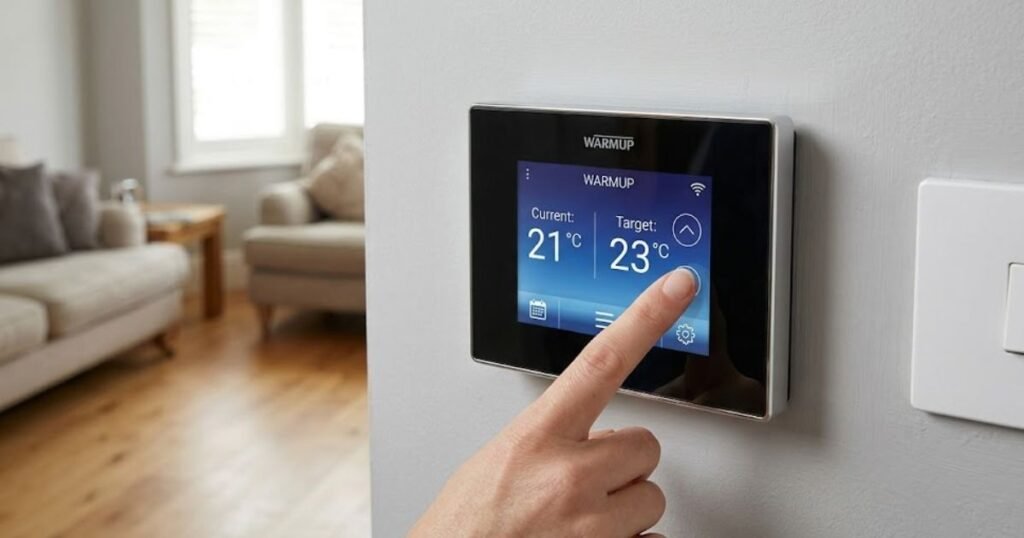
- Touchscreen displays
- Energy usage tracking
- Safety features like ground-fault protection and open-window detection
Which sensing mode you use depends on the room and the system. A bathroom floor, for example, is usually set with a floor temperature limit so the tile stays comfortable underfoot without overheating the slab, while a great-room application might lean more on air sensing for whole-room comfort.
Warmup Thermostat Models: Which Ones Are Available?
Warmup’s thermostat lineup has changed significantly over the past couple of years. As of 2026, the 7iE is the current flagship smart thermostat, while the 6iE and 4iE both popular in their day, have been discontinued. Warmup’s own identification documentation confirms the 6iE was phased out in mid-to-late 2025, with the 7iE positioned as its direct successor, sharing a similar physical design but with updated internals.
| Model | Type | Heating Application | Smart/Wi-Fi | Current Status (2026) | Best For |
| 7iE | Smart touchscreen, Matter-enabled | Electric & hydronic underfloor heating, compatible baseboard | Yes — Wi-Fi + Matter | Current | New installs, replacements, smart-home integration |
| 6iE | Smart touchscreen | Electric underfloor heating | Yes — Wi-Fi | Discontinued (2025) | Existing installations only |
| 4iE | Smart touchscreen | Electric underfloor heating, compatible baseboard | Yes — Wi-Fi | Discontinued | Existing installations only |
| Terra | Basic smart thermostat | Electric underfloor heating | Yes — Wi-Fi | Current (entry-level smart option) | Budget-conscious smart control |
| EZPT | Programmable, non-Wi-Fi | Electric underfloor heating | No | Current | Simple scheduling without an app |
| RFT-Basic | Basic touchscreen | Electric underfloor heating | No | Discontinued, replacement available | N/A — legacy installs |
Availability and naming can shift, so always confirm current status on Warmup’s official U.S. site or with an authorized retailer before buying.
READ MORE: Step-by-Step DIY Smart Thermostat Installation Guide
Warmup Thermostat Review
1. Warmup 7iE Smart Thermostat
The 7iE is Warmup’s current smart flagship, and it’s the model most homeowners buying new in 2026 will end up with. Its standout feature is Matter support, which lets it integrate with Apple Home, Google Home, and Amazon Alexa for voice control and cross-platform automation something earlier Warmup thermostats didn’t offer.
Key characteristics of the 7iE:
- Full-color touchscreen with a QR-code-based setup process
- Wi-Fi connectivity paired with Warmup’s MyHeating app
- SmartGeo technology, which builds an automatic heating schedule based on occupancy patterns rather than requiring the homeowner to program one manually
- Dual-voltage operation (120V–240V) with a built-in Class A GFCI
- Compatible with electric and hydronic underfloor heating systems, as well as compatible baseboard heating, up to roughly 15A of load
- A floor sensor probe included at the standard length, with the option to extend it for larger installations
- Access to Warmup’s Smartcare support service, which uses data from the thermostat for remote diagnostics
If you’re shopping for a Warmup thermostat today, whether for a new bathroom remodel or replacing an aging unit the 7iE is the one to look at first.
2. Warmup 6iE Smart Thermostat
The 6iE was, for several years, Warmup’s top-tier smart offering, and it’s still installed in a large number of American homes. According to Warmup’s current documentation, however, the 6iE was discontinued in mid-to-late 2025. It’s no longer sold as a new product, though existing units remain supported.
The 6iE offered:
- A high-resolution color touchscreen with customizable backgrounds and layouts
- SmartGeo automatic scheduling
- Weather-based Early Start, which adjusts when heating kicks on based on outdoor conditions
- MyHeating app control and monitoring
If you already have a 6iE installed, there’s usually no urgent reason to replace it; it will continue to function and can still be registered and managed through the MyHeating app. Things worth thinking about, though:
- If it ever fails, replacement units may be harder to source, and the eventual replacement will likely be a 7iE
- App support and firmware updates for older hardware can lag behind current models over time
- If you’re buying a home with a 6iE already installed, it’s worth confirming warranty status with Warmup rather than assuming full coverage
- Avoid buying “new old stock” 6iE units unless you fully understand the limited or discontinued support that comes with them
3. Warmup 4iE Smart Wi-Fi Thermostat
The 4iE predates the 6iE and is also listed as discontinued in Warmup’s current model guide. It introduced several ideas that Warmup carried into later models:
- A touchscreen interface with smartphone/tablet/web control through the MyHeating app
- A self-learning function that built a schedule based on how the homeowner manually adjusted the thermostat over time
- SmartGeo location-based automation, using phone location to anticipate when heat was needed
- Support for electric radiant floor heating and, in specific configurations, compatible baseboard heating subject to defined electrical load limits and wiring setup (including relay and hydronic configuration options in some installations)
If you have a 4iE, the same general guidance applies as with the 6iE: it will keep working, but plan for eventual replacement with a current model, and don’t expect it to be sold as new inventory going forward.
4. Other Warmup Thermostats
Beyond the smart iE line, Warmup also offers simpler, non-Wi-Fi options for homeowners who don’t need app control:
- Terra — an entry-level smart Wi-Fi thermostat for those who want basic app-based control without the full feature set of the 7iE
- EZPT — a straightforward programmable thermostat (120V/240V) with no app connectivity, suited to homeowners who just want reliable scheduling
- RFT-Basic — an older, simpler touchscreen model, now discontinued with a current replacement available
Older discontinued controllers you might encounter in an existing home include the RFT, XSTAT, OCC2, and similar legacy units. These aren’t something you’d buy new in 2026, but if your home has one, Warmup still maintains support documentation for identification and eventual replacement.
Quick Comparison: 7iE vs 6iE vs 4iE
| Feature | 7iE (Current) | 6iE (Discontinued 2025) | 4iE (Discontinued) |
| Smart home integration | Matter (Apple Home, Google Home, Alexa) | MyHeating app only | MyHeating app, Google Home |
| Touchscreen | Yes, full color | Yes, full color, customizable | Yes |
| Automatic scheduling | SmartGeo | SmartGeo | SmartGeo + self-learning |
| GFCI protection | Built-in Class A | Model-dependent | Model-dependent |
| Purchase status | Available new | Not available new | Not available new |
| Best fit | New installs & replacements | Existing installs only | Existing installs only |
READ MORE: Ecobee vs Honeywell vs Nest: Which Smart Thermostat Is Best?
Warmup Thermostat Features You Should Know
Smart Wi-Fi Control
On Wi-Fi-enabled models, the MyHeating app lets you check and adjust your floor heating from anywhere with an internet connection useful for pre-heating a bathroom before you get out of bed or checking that heat is off while you’re on vacation.
SmartGeo / Location-Based Heating
SmartGeo uses your phone’s location to help the thermostat anticipate when you’re likely to be home versus away, adjusting the schedule automatically rather than requiring you to build a program from scratch. It’s a convenience feature, not a substitute for checking your actual settings if something seems off.
Learning and Automatic Scheduling
On models that support it, the thermostat can build a schedule based on how heating is manually adjusted over time and how quickly your specific floor heats and cools. This is designed to reduce the need for manual programming, though it typically takes some time to “learn” a household’s patterns.
Floor and Air Sensors
Floor sensors are especially valuable in bathrooms and kitchens, where the goal is often a comfortable floor surface rather than a specific air temperature. Setting a floor temperature limit also helps protect certain flooring materials, like engineered wood, from overheating.
Energy Monitoring
Smart models can show usage data through the app, which helps homeowners understand how much their floor heating is running and spot unusual patterns like a system that’s cycling far more than expected.
Touchscreen Interface
Full-color touchscreens make day-to-day adjustments easier to read and navigate than older button-based thermostats, particularly for households that don’t use the app regularly.
Open Window Detection
This feature is designed to save energy by recognizing a sudden, sharp temperature drop the kind that happens when a nearby window or door is opened and temporarily reducing heating output in response. It’s a safeguard against wasted energy, not a literal window sensor. Note that it can occasionally be triggered by other rapid temperature swings, like nearby air conditioning, which is worth knowing if your thermostat seems to dial back unexpectedly.
Pro Tip: If your thermostat’s floor heat keeps cutting out and you have a nearby AC vent or window, check whether open window detection is being triggered before assuming something’s broken.
Warmup Thermostat for Underfloor Heating
Radiant floor heating behaves differently from forced-air HVAC, which is exactly why a purpose-built thermostat matters. Forced air heats a room quickly and stops; radiant floors heat more slowly, through mass, and hold that heat longer. That changes how scheduling and sensing should work.
Common electric underfloor heating applications include:
- Bathroom floors, where floor-temperature comfort is the priority
- Kitchen floors, often run on a schedule tied to morning and evening use
- Bedroom floors, for consistent overnight comfort
- Basement floors, sometimes used for both comfort and moisture/condensation management
- Whole-home primary radiant heating in some builds
Practical example: A homeowner may want the bathroom floor warm at 6:30 a.m. without keeping the entire house at that temperature all night. This is where zoning and scheduling come in — a Warmup thermostat dedicated to that zone can be set to start warming the floor 30–60 minutes before the household wakes up, based on how long that specific floor takes to heat, without touching the rest of the home’s heating.
READ MORE: Best ecobee Smart Thermostat Review: Essential vs Enhanced vs Premium
Warmup Thermostat vs Traditional Thermostat
| Feature | Warmup Thermostat | Conventional HVAC Thermostat |
| Electric floor heating | Yes, where compatible | Often no |
| Floor sensor | Available on compatible systems | Usually no |
| Air temperature control | Yes | Yes |
| Wi-Fi | Model-dependent | Model-dependent |
| Radiant floor applications | Excellent fit | Model-dependent |
| High-voltage compatibility | Model-dependent | Usually not |
| Smart scheduling | Model-dependent | Common |
| Best use | Radiant/underfloor heating | Central HVAC |
The takeaway: compatibility, not just “smartness,” is what matters here. A feature-rich thermostat that isn’t rated for your heating system’s voltage and load simply won’t work safely, regardless of how good its app is.
Warmup Thermostat vs Nest vs ecobee
This isn’t really a head-to-head “which is better” comparison; the three products are built for different jobs.
- Warmup thermostats specialize in electric (and some hydronic) radiant floor heating, with floor-sensing capability and load ratings built around that use case.
- Nest is built around central forced-air HVAC systems (furnaces, heat pumps) and generally isn’t designed to directly control line-voltage electric floor heating cables.
- ecobee similarly focuses on central HVAC, with strong smart-home integration and room-sensor add-ons for air temperature but again, not built for line-voltage radiant floor circuits.
Where they overlap: all three now offer app control, scheduling, and (on newer models) Matter-based smart-home integration. Where they diverge: voltage, load ratings, and floor-sensor support.
A thermostat with more smart-home features is not automatically the correct thermostat for electric radiant floor heating. If you have a heated floor and are tempted by a Nest or ecobee because of brand recognition or ecosystem integration, confirm with the manufacturer, not just a product listing whether it’s actually rated to control your specific heating cable or mat before buying.
READ MORE: Best Energy Star Smart Thermostats: Reviews, Comparison, and Buying Guide
How to Choose the Right Warmup Thermostat
Before You Buy a Warmup Thermostat, Check These 8 Things
- Heating system type — electric floor heating, hydronic, or baseboard
- Voltage — 120V, 240V, or dual-voltage support
- Total heating load (wattage/amperage) of the zone you’re controlling
- Number of zones you need to manage independently
- Whether you need floor sensing, air sensing, or both
- Wi-Fi and app control needs — do you actually want remote access, or is a simple programmable unit enough?
- Smart-home compatibility — Matter, specific voice assistants, or none
- Existing wiring and mounting box — confirm compatibility before ordering a replacement
Beyond that checklist, check GFCI requirements for your specific installation and local electrical code, and factor in whether you’ll need a licensed electrician for the swap.
Warmup Thermostat Installation
This is a high-level overview, not a substitute for the model-specific installation manual or a licensed electrician.
- Identify your existing heating system (electric, hydronic, or baseboard).
- Verify the voltage and total load of the circuit.
- Confirm the thermostat model is rated for that voltage and load.
- Locate or verify the floor sensor probe, if your setup uses one.
- Turn off power at the appropriate breaker before doing any wiring work.
- Follow the model-specific installation manual for wiring and mounting.
- Configure the thermostat for air control, floor control, or both.
- Connect to Wi-Fi if the model supports it.
- Test heating operation to confirm the system responds correctly.
- Confirm the thermostat reaches and holds the target temperature over a full cycle.
Warmup’s own setup documentation notes that initial programming typically involves selecting the correct heating configuration hydronic, electric, or electric-with-relay so getting that step right early avoids troubleshooting headaches later.
Line-voltage electrical work should be performed by a qualified electrician when required by local code, or any time you’re not confident doing it yourself. This isn’t optional caution; getting wiring wrong on a line-voltage circuit is a real safety risk.
Warmup Thermostat Settings: How to Get the Most From It
Menus vary by model, but most Warmup smart thermostats include some version of the following:
- Target temperature — the setpoint for air, floor, or both
- Schedule — daily/weekly programming
- Away settings — reduced heating when nobody’s home
- Floor temperature limits — protects certain flooring materials from overheating
- Air vs. floor control mode — which sensor drives heating decisions
- Early Start — begins heating early enough to hit your target temperature by a set time
- SmartGeo — automatic, location-based scheduling on supported models
- Open window detection — toggleable energy-saving safeguard
- Wi-Fi setup — network connection for app control
- Energy usage tracking — historical run-time data
- Date/time — needed for accurate scheduling
Warmup Thermostat Troubleshooting
| Problem | Possible Cause | What to Check |
| Screen is blank | Power issue | Breaker, power supply, wiring connections |
| Floor is not heating | Heating system or sensor issue | Mode settings, sensor wiring, system status |
| Wi-Fi won’t connect | Network or setup issue | Wi-Fi credentials, router distance/signal |
| Temperature seems inaccurate | Sensor or configuration issue | Air vs. floor control mode |
| Heating turns off too quickly | Incorrect settings | Temperature limits, open window detection |
| Thermostat won’t respond | Software or power issue | Restart or factory reset procedure |
| App can’t control thermostat | Connectivity or account issue | Internet connection, app login/account status |
Pros and Cons of a Warmup Thermostat
Pros
- Purpose-built for radiant and underfloor heating applications
- Floor-temperature sensing on compatible systems
- Smart scheduling and remote access on Wi-Fi models
- Modern touchscreen interfaces on current smart models
- Specialized functionality that generic HVAC thermostats don’t offer
Cons
- Higher cost than a basic programmable thermostat
- Compatibility (voltage, load, sensor type) is more involved to verify than with a standard thermostat
- Some popular models (6iE, 4iE) are now discontinued
- Line-voltage installation may require a licensed electrician
- Not a universal replacement for a conventional central-HVAC thermostat
- Feature sets vary meaningfully between models, so “a Warmup thermostat” isn’t one single product
Is a Warmup Thermostat Worth It?
Likely worth it for:
- Homeowners with electric underfloor heating who want reliable, floor-aware temperature control
- Anyone heating a bathroom floor who wants precise comfort without overheating the tile
- Homeowners who want smartphone or voice control over their heating
- People replacing an aging, compatible Warmup thermostat with a current model
Probably not necessary for:
- Homes with only conventional central HVAC and no radiant floor system
- Homeowners looking for the cheapest possible basic thermostat with no floor-heating needs
- Anyone expecting a floor-heating thermostat to also manage a whole-house furnace or heat pump
Warmup Thermostat Cost
Pricing varies by model, retailer, and whether it’s bundled into a full heating-system kit. As a general reference point, current smart models like the 7iE have listed near the $300 range at authorized retailers, while simpler non-Wi-Fi programmable options run lower. Always confirm current pricing directly from Warmup’s official U.S. site or an authorized retailer, since list prices, promotions, and availability change.
It’s also worth separating two different costs:
- The thermostat itself — a single wall-mounted control unit
- The full radiant floor heating system — mats/cables, installation labor, and any electrical work
A thermostat replacement is a relatively modest cost. Installing an entire new underfloor heating system is a much larger project, and the thermostat is only one part of that budget.
Maintenance and Long-Term Considerations
- Keep the touchscreen clean and free of dust or moisture, especially in bathrooms
- Periodically confirm Wi-Fi and app connectivity, particularly after router changes
- Watch for unusual heating behavior — short-cycling, inconsistent floor temperature, or unexpected shutoffs
- Check sensor performance occasionally, especially in older installations
- Keep your installation documentation and model number on file for future reference
- Review warranty terms for your specific model directly through Warmup’s official documentation
- If you own a discontinued model (6iE or 4iE), think ahead about replacement availability before it fails unexpectedly
Frequently Asked Questions
Is Warmup a good thermostat for underfloor heating?
Yes — Warmup thermostats are purpose-built for radiant floor heating, with floor-sensing and load ratings designed around that application, which is something generic HVAC thermostats generally aren’t built for.
Is a Warmup thermostat compatible with Nest?
Not directly, in most cases. Compatibility depends on your specific heating system’s voltage, wiring, and load — Nest and similar central-HVAC thermostats generally aren’t rated to control line-voltage electric floor heating circuits. Don’t assume compatibility without checking your exact setup.
What is the difference between the Warmup 6iE and 7iE?
The 7iE is the current model and successor to the 6iE, adding Matter smart-home support (Apple Home, Google Home, Alexa) that the 6iE didn’t have. Warmup’s documentation confirms the 6iE was discontinued in mid-to-late 2025, so new purchases today are 7iE units, even though the two look similar on the wall.
Can I replace my Warmup thermostat myself?
It depends on your comfort and qualifications with line-voltage electrical work. Swapping a simple low-voltage thermostat is very different from working with a high-voltage electric floor-heating circuit. When in doubt, or where local code requires it, use a licensed electrician.
Why is my Warmup thermostat not heating the floor?
Common causes include an incorrect mode setting (air vs. floor), a scheduling issue, a temperature setting that’s lower than expected, a faulty or disconnected floor sensor, a tripped breaker or GFCI, a problem with the heating cable or mat itself, or a thermostat malfunction. Start with the settings and power supply, and call a professional if wiring or the heating element itself is suspected.
Final Verdict
A Warmup thermostat isn’t just a smart-home accessory, it’s a control built specifically around the way radiant floor heating actually behaves, with sensing options and load ratings that generic HVAC thermostats don’t offer. The 7iE is the model to focus on for new purchases in 2026, while the 6iE and 4iE remain fine to keep running in existing homes but shouldn’t be shopped for as new products. Compatibility voltage, load, sensor type matters far more than feature count, and current model availability matters more than most buyers expect going in.