We’ve all been there: staring at a clunky, beige plastic box on the wall, trying to program a “schedule” that feels more like solving a Rubik’s Cube. Or worse, lying in bed on a freezing morning, wishing you could turn up the heat without leaving the cocoon of your blankets.
Enter the Sensi Smart Thermostat.
While big names like Nest and Ecobee often hog the spotlight with their futuristic “halos” and high price tags, Sensi (backed by the HVAC experts at Emerson/Copeland) has quietly become the darling of the DIY homeowner. Why? Because Sensi doesn’t try to be a smartphone for your wall. It tries to be a damn good thermostat that happens to be smart.
In this guide, we’re going to break down everything you need to know about the Sensi lineup from the classic ST55 to the sleek Touch 2 (ST76). Whether you’re trying to shave 20% off your utility bill or you just want to control the AC from your couch, we’ve got you covered. Lets deep dive into “Sensi Smart Thermostat 2026 Review & Comparison”
READ MORE: Best Honeywell Thermostat Models (2026): Buyer’s Guide & Comparison
What Is the Sensi Smart Thermostat?
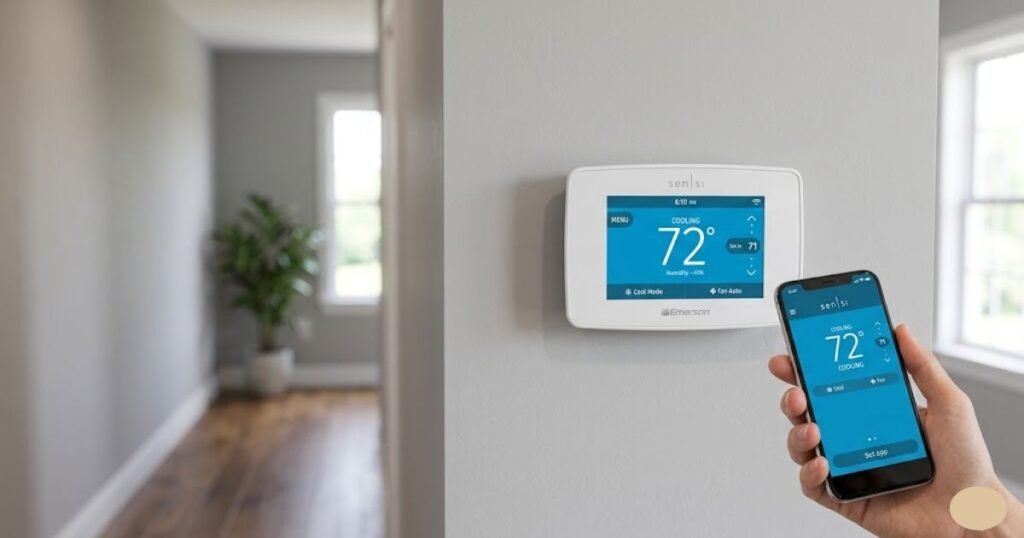
At its core, the Sensi Smart Thermostat is a Wi-Fi-enabled bridge between your HVAC system and your smartphone. It replaces your traditional “dumb” thermostat and gives you total control over your home’s climate through the Sensi app.
Why do homeowners choose it?
Sensi has carved out a niche for being the “practical” choice. It appeals to budget-conscious households who want the perks of a smart home without a complicated installation process or a $250 price tag. It’s also a top pick for people who value privacy; unlike some competitors, Sensi doesn’t use your data for advertising or sell your habits to third parties.
How it works:
Once installed, the thermostat connects to your home Wi-Fi. You can then use the Sensi app to change temperatures, set seven-day schedules, or even let the thermostat use your phone’s location (geofencing) to turn the air down when you leave the house and back up when you’re five minutes away.
Why Homeowners Consider Sensi Smart Thermostat
If you’re on the fence about upgrading, here is why Sensi usually wins over the average American homeowner:
- The Comfort Factor: No more waking up in a sweat or coming home to a fridge-cold living room. You have “precision comfort” at your fingertips.
- The “Invisible” Assistant: With features like smart alerts, the thermostat will literally email you if your furnace dies while you’re on vacation or if the humidity levels get high enough to risk mold.
- Privacy-First Design: In an era where every device seems to be “listening,” Sensi keeps things simple. They don’t use your temperature data for anything other than keeping you comfortable.
- Universal Compatibility: Sensi works with the “Big Three” smart home ecosystems: Amazon Alexa, Google Assistant, and Apple HomeKit.
Key Benefits of Sensi Smart Thermostat:
- Remote Access: Control your home from the office, the grocery store, or the airport.
- Energy Savings: Sensi claims their thermostats can save users about 23% on HVAC energy costs.
- Humidity Monitoring: Essential for homeowners in the South or those worried about dry winter air.
- Easy DIY: Most people can get a Sensi up and running in under 30 minutes.
READ MORE: Best Programmable Thermostats (2026) | Top Rated Reviews
Key Features of Sensi Smart Thermostat
What actually happens under the hood? Here are the major features that make a Sensi a Sensi:
1. Wi-Fi Connectivity & App Control
The app is the heart of the experience. It’s clean, intuitive, and most importantly it doesn’t crash. You can manage multiple thermostats (great for multi-story homes or vacation rentals) all from one login.
2. Geofencing
This is a game-changer for people with unpredictable schedules. Instead of a rigid “9-to-5” schedule, geofencing uses your phone’s GPS. When you move 3 miles away from home, the thermostat enters “Away” mode. When you cross that radius on your way back, it starts cooling or heating so it’s perfect the moment you walk in the door.
3. Smart Alerts
Sensi monitors your system 24/7. It will alert you to:
- Unusually high or low temperatures.
- Loss of Wi-Fi connection.
- Humidity levels that are out of range.
- Filter change reminders.
4. Humidity Tracking
Not all smart thermostats track humidity, but Sensi does. This allows you to see if you need to run a dehumidifier or adjust your HVAC settings to prevent that “sticky” feeling in the summer.
5. Flexible Scheduling
You can set a different schedule for every day of the week, or group them (5-2 day scheduling). It’s perfect for families, shift workers, or anyone who likes their house cooler at night.
READ MORE: Heatmiser Thermostat Review & U.S. Buying Guide (2026)
Sensi Smart Thermostat 2026 Review & Comparison
Let’s get into the nitty-gritty. Sensi has three main models. Choosing the right one depends entirely on your home’s wiring and your personal style.
Product 1: Sensi Smart Thermostat (ST55)
The “Traditional” Powerhouse
The ST55 is the thermostat for people who don’t want their house to look like a tech lab. It features a traditional horizontal design with physical buttons and a simple, non-touch digital display.
- Best For: Older homes, budget-conscious DIYers, and people who prefer physical buttons over touchscreens.
- The “Magic” Feature: This is one of the few smart thermostats that does not require a C-wire for most heating and cooling systems. If you have an older house with only two or four wires behind the wall, this is your best friend.
Strengths:
- Extremely easy installation (often no extra wiring needed).
- Familiar look that won’t confuse guests or elderly family members.
- Full smart features (App, Alexa, HomeKit) despite the “old school” look.
Drawbacks:
- The display isn’t as pretty as the Touch models.
- No “active” backlight (it only lights up when you press a button).
- Requires 2 AA batteries if you don’t have a C-wire.
Final Verdict: The ST55 is the most reliable, “set it and forget it” smart thermostat on the market. It’s proof that you don’t need a fancy screen to have a smart home.

- PRIVACY PROTECTION*: Sensi won’t sell your personal information to third parties
- EASY DIY INSTALLATION: Use the built-in level and step-by-step app instructions for a quick installation. Works with HVA…
- SAVE ABOUT 23% ON HVAC ENERGY*: The ENERGY STAR-certified Sensi smart thermostat can help you save energy with features …
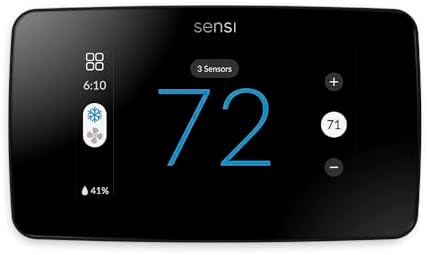
Product 2: Sensi Touch 2 Smart Thermostat (ST76)
The Modern Flagship
The ST76 is the newest member of the family. It’s sleek, has a gorgeous glass touchscreen, and finally brings Sensi into the “room sensor” era.
- Best For: Modern homes, tech enthusiasts, and homeowners with “hot spots” or “cold spots” in certain rooms.
- The “Magic” Feature: Room Sensor Compatibility. You can place small Sensi sensors in bedrooms or offices, and the ST76 will prioritize those rooms to ensure they stay comfortable, even if the thermostat is in a drafty hallway.
Strengths:
- Beautiful, high-contrast touchscreen that’s easy to read from across the room.
- Optional room sensors solve the “master bedroom is always too hot” problem.
- Enhanced privacy features and a very premium feel.
Drawbacks:
- Requires a C-wire. No exceptions here.
- More expensive than the ST55.
Final Verdict: If you want the best of what Sensi offers, the Touch 2 is it. It rivals the Nest Learning Thermostat in looks but beats it in reliability and simplicity.
- WORKS WITH ROOM SENSORS: Compatible with Sensi Room Sensors to balance temperatures throughout your home (sold separatel…
- PRIVACY PROTECTION: Sensi won’t sell your personal information to third parties
- SAVE ABOUT 23% ON HVAC ENERGY: The ENERGY STAR-certified Sensi Touch 2 smart thermostat can help you save energy with fe…
READ MORE: How to Test a Water Heater Thermostat — Easy DIY Guide
Product 3: Emerson Sensi Touch Wi-Fi Smart Thermostat (ST75)
The Middle Ground
The ST75 was Sensi’s first foray into touchscreens. It’s a solid, reliable device that offers a big, bright color display for a very reasonable price.
- Best For: Homeowners who want a touchscreen but don’t care about room sensors.
- The “Magic” Feature: The customizable terminal lights. When you’re installing it, there’s a tiny light that illuminates the wire terminals—a small detail that makes DIY installation much less frustrating.
Strengths:
- Excellent color touchscreen with big, easy-to-tap numbers.
- Changeable background colors to match your wall paint.
- Very intuitive interface.
Drawbacks:
- Requires a C-wire.
- No battery backup; if the power goes out, the screen goes dark.
- Does not support the new Sensi room sensors (only the ST76 does).
Final Verdict: The ST75 is a fantastic “standard” smart thermostat. If you have a C-wire and want a modern look without the “newest model” premium price, this is the sweet spot.

- PRIVACY PROTECTION*: Sensi won’t sell your personal information to third parties
- EASY DIY INSTALLATION: Use the built-in level, illuminated easy-click terminals and step-by-step app instructions for a …
- SAVE ABOUT 23% ON HVAC ENERGY*: The ENERGY STAR-certified Sensi smart thermostat can help you save energy with features …
Sensi Smart Thermostat Comparison
To make your decision easier, let’s look at how these three stack up side-by-side.
| Feature | Sensi ST55 (Classic) | Sensi ST75 (Touch) | Sensi ST76 (Touch 2) |
| Display Type | Non-touch LCD | Color Touchscreen | Modern Glass Touchscreen |
| C-Wire Required? | Usually No | Yes | Yes |
| Room Sensors? | No | No | Yes |
| Design | Traditional/Horizontal | Modern/Sleek | Premium/Minimalist |
| Installation | Easiest | Moderate | Moderate |
| Price Point | Budget-Friendly | Mid-Range | Premium |
Which one should you buy?
- The Budget Shopper: Go with the ST55. You get 100% of the smart features for the lowest price, and you likely won’t have to hire an electrician to run a new wire.
- The Modern Techie: Go with the ST75. It looks great on the wall, provides a clear “status” at a glance, and feels like a modern upgrade.
- The Problem Solver: Go with the ST76 (Touch 2). If your nursery is freezing while your living room is boiling, the room sensor support is worth every penny.
READ MORE: 8 Best DREO Smart Tower Fans 2026: Review & Comparison
Best Sensi Thermostat for Different Homeowners
Still not sure? Let’s look at some real-world scenarios:
- Best for First-Time Buyers: Sensi ST55. It’s the least intimidating entry point into smart home tech. If you can change a lightbulb, you can install this.
- Best for Older Homes (Built before 1980): Sensi ST55. Older homes rarely have a “Common” (C) wire. The ST55 is designed specifically to work around this limitation using two AA batteries.
- Best for Families with Kids: Sensi ST76. The room sensors are a lifesaver for ensuring the kids’ rooms are at the perfect temperature for sleep, regardless of where the main thermostat is located.
- Best for Style-Conscious Owners: Sensi ST75 or ST76. Let’s be honest, the classic model looks like… a thermostat. The Touch models look like a piece of high-end tech.
Sensi Smart Thermostat Installation and Compatibility
One of the biggest hurdles to buying a smart thermostat is the fear of “will it work with my heater?”
Check Your Wiring
Before you click “buy,” pop the cover off your current thermostat.
- Count the wires.
- Look for a wire connected to a terminal labeled “C”.
- If you see a C-wire, you can buy any Sensi model.
- If you don’t see a C-wire, you should probably stick with the ST55 or be prepared to install a “C-wire adapter kit.”
HVAC Compatibility
Sensi works with about 95% of North American systems, including:
- Gas, Oil, and Electric furnaces.
- Heat pumps (with or without auxiliary heat).
- Cool-only systems.
- Note: Sensi does not work with baseboard electric heat (120V/240V) or “millivolt” systems (like some wall heaters or fireplaces).
DIY Tips:
- Label your wires: Sensi includes stickers in the box. Use them! Don’t trust your memory.
- Take a photo: Before you disconnect the old one, snap a picture of the wiring.
- Turn off the breaker: Safety first. You don’t want to blow a fuse in your furnace control board.
READ MORE: Ultra Quietest Heat Pump for Your Home: Review, Comparison & Cost
Sensi Smart Thermostat Energy Savings and Monthly Cost Benefits
Is a smart thermostat actually an investment, or just a toy?
According to Emerson’s internal studies, Sensi users save an average of 23% on their energy bills. For the average American home, that means the thermostat pays for itself in roughly one to two years.
How does it save money?
- No more “cooling the neighborhood”: Geofencing ensures you aren’t blasting the AC while you’re at work.
- Usage Reports: The Sensi app shows you exactly how many hours your system ran each day. If you see a spike on Tuesday, you can figure out why (did someone leave a window open?) and adjust.
- Utility Rebates: Many power companies (like Duke Energy or PG&E) offer $50 to $100 rebates just for installing a smart thermostat. Check the Sensi website for a rebate finder!
Sensi Smart Thermostat Privacy and Smart Home Integration
We live in a world where data is the new oil. Many homeowners are hesitant to put a “smart” device in their home because they don’t want Big Tech tracking their every move.
The Privacy Edge
Sensi makes a big deal about privacy. They explicitly state:
- They do not sell your personal data.
- They do not track your location for advertising purposes.
- The geofencing data stays between your phone and your thermostat.
Smart Home Ecosystems
Whether you’re an Apple fan or an Android devotee, Sensi plays nice with everyone:
- Amazon Alexa: “Alexa, set the hallway to 72 degrees.”
- Google Assistant: “Hey Google, what’s the humidity inside?”
- Apple HomeKit: Use the “Home” app on your iPhone to create “Scenes” (e.g., a “Goodnight” scene that locks the doors and lowers the heat).
- Samsung SmartThings: Integrate your HVAC with your smart lights and security cameras.
READ MORE: Solar Powered Heat Pump Cost: USA Homeowner Guide to Savings
Sensi Smart Thermostat Pros and Cons
Overall Sensi Brand
Pros:
- No-nonsense reliability.
- Excellent customer support based in the USA.
- Highly rated mobile app.
- Great privacy policy.
Cons:
- Doesn’t have the “auto-learning” features of Nest (which some people actually prefer, as auto-learning can be annoying).
- The ST55 design is a bit dated for modern aesthetics.
Model-Specific Pros & Cons
- ST55: + No C-wire needed; – Basic screen.
- ST75: + Great price for a touchscreen; – Requires C-wire.
- ST76: + Room sensor support; – Most expensive model.
FAQs
Is the Sensi Smart Thermostat worth it?
Absolutely. If you want a reliable way to control your home’s climate from your phone and save money on your electric bill, Sensi offers the best “bang for your buck” in the industry. It’s less “finicky” than its competitors and much easier to install.
Does the Sensi Smart Thermostat need a C-wire?
It depends on the model. The ST55 (Classic) does not require a C-wire for most systems because it can run on AA batteries. However, the ST75 (Touch) and ST76 (Touch 2) require a C-wire to power their large color screens.
What is the difference between ST55 and ST75?
The ST55 is a traditional-looking thermostat with physical buttons and a simple LCD screen. The ST75 is a modern touchscreen model with a color display. Internally, they both offer Wi-Fi, scheduling, and smart alerts, but the ST75 requires a C-wire while the ST55 usually does not.
Is Sensi Touch 2 better than Sensi Touch?
“Better” depends on your needs. The Sensi Touch 2 (ST76) is the superior model because it supports remote room sensors, which can help balance the temperature in different parts of your house. It also has a slightly more modern, edge-to-edge glass design. If you don’t need room sensors, the original Sensi Touch (ST75) is a great way to save a little money.
Does Sensi work with Alexa, Google Assistant, and other smart home systems?
Yes! All three Sensi models are fully compatible with Amazon Alexa, Google Assistant, Apple HomeKit, and Samsung SmartThings. You can use voice commands or your favorite smart home app to control them.
Conclusion
At the end of the day, a thermostat’s job is to keep you comfortable without making you think too hard about it. The Sensi Smart Thermostat lineup succeeds because it balances “smart” features with “real world” practicality.
- If you live in an older home and want a 15-minute DIY project, buy the Sensi ST55.
- If you want a beautiful, bright screen that acts as a centerpiece for your smart home, go for the Sensi ST75.
- If you’re struggling with uneven temperatures in your house and want the latest and greatest, the Sensi Touch 2 (ST76) is your best bet.
Stop fighting with that old beige box. Pick the Sensi that fits your home, grab a screwdriver, and start enjoying a more comfortable (and cheaper) home today.