So you’re shopping for a smart thermostat, and right there on the box or the compatibility checker, you see it: “C-wire required or recommended.” If you’re like most homeowners, your next move is probably to pull off your old thermostat’s faceplate and squint at a tangle of colored wires, wondering which one is the mysterious “C.”
You’re not alone. This is one of the most common questions I get called about as an HVAC technician, especially since smart thermostats from Nest, Ecobee, and Honeywell became popular. Many U.S. homes, especially those built before the 2000s, were wired for simple thermostats that never needed constant power — so there’s no C-wire terminal in use, even if the wire is technically sitting behind the wall.
In this guide, I’ll walk you through exactly what an HVAC C-wire is, why your smart thermostat wants one, how to check whether you already have one, and what to do if you don’t. By the end, you’ll know exactly where you stand and what your next step should be. Lets deep dive into “What Is an HVAC C-Wire? Do You Need One?”
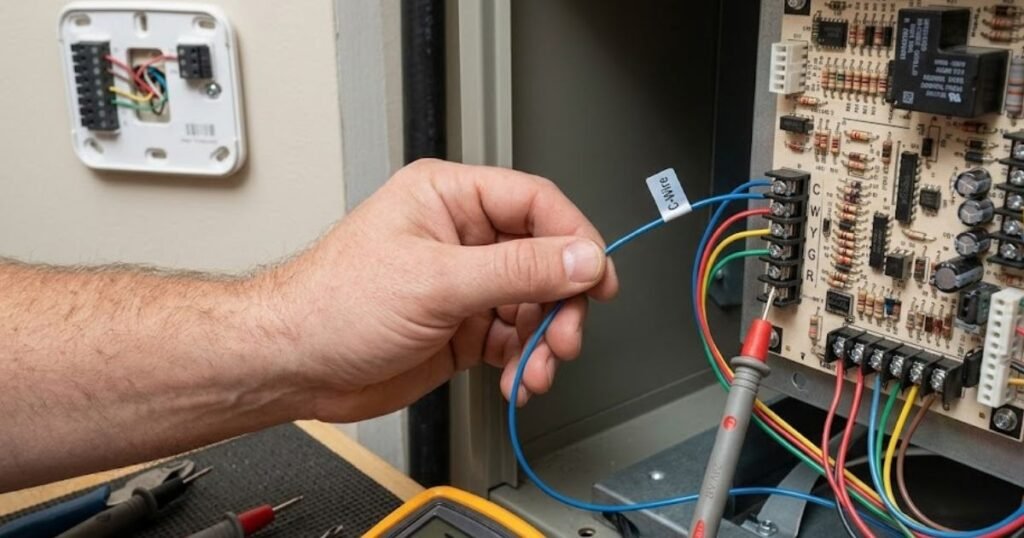

What Is an HVAC C-Wire?
The “C” stands for common wire, and it’s part of your home’s low-voltage (24V) HVAC control system, the same system that connects your thermostat to your furnace, air handler, or heat pump.
Here’s the simple version: your HVAC system uses a transformer to step household power down to 24 volts. That 24V circuit needs a complete loop to work, just like any electrical circuit. The R wire delivers power out to the thermostat. The C-wire completes the loop by sending that power back to the transformer, providing continuous, uninterrupted power.
Think of it like a two-lane road: one lane sends power to the thermostat, the other lane sends it back. Without the C-wire, your thermostat only gets power in short bursts when it “calls” for heating or cooling — not a steady stream.
- Signal wires (like Y for cooling, W for heating, and G for the fan) carry that power back to the equipment to turn components on or off.
- The C-wire (Common) acts as the return pipe back to the transformer. It completes the electrical circuit directly at the thermostat.
READ MORE: Best Honeywell Thermostat Models: Buyer’s Guide & Comparison
What Does a C-Wire Actually Do?
A C-wire supplies constant 24V power to your thermostat so it can run features that older thermostats never needed:
- Wi-Fi connectivity
- Full-color touchscreens
- Smart scheduling and geofencing
- Automatic firmware updates
- Motion and humidity sensors
- Two-way communication with a mobile app
Quick Facts Box
- The C-wire carries 24 volts, not household voltage — it’s safe to handle.
- It does not control heating or cooling directly; it just powers the thermostat.
- Most smart thermostats can technically run without one using battery power, but performance and reliability suffer.
Why Older Thermostats Didn’t Need a C-Wire
If C-wires are so essential today, why don’t older homes have them?
For decades, thermostats were simple devices. Older systems used:
- Mercury Switch Thermostats: Liquid mercury inside a glass bulb tipped back and forth to physically bridge two wires. Zero power required.
- Mechanical Bimetal Thermostats: Two strip metals expand and contract at different rates to open or close contacts. Zero power required.
- Battery-Powered Digital Thermostats: Standard AA or AAA batteries powered simple digital LCD displays.
- Power-Stealing Thermostats: Early digital units attempted to “steal” tiny bits of electricity from the heating or cooling signal wires when the system was idle.
Because older HVAC equipment only needed simple ON/OFF signals, builders routinely installed 4-conductor cable (R, W, Y, G). They skipped the fifth wire, the thermostat common wire to save money during construction.
READ MORE: Best Energy Star Smart Thermostats: Reviews, Comparison, and Buying Guide

Do You Really Need a C-Wire?
It depends on your thermostat and your HVAC system.
Smart Thermostats
- Nest – Some models can run without a C-wire using power-stealing technology, but performance (especially Wi-Fi stability) is more reliable with one.
- Ecobee – Ecobee includes a “Power Extender Kit” (PEK) as a workaround if you don’t have a C-wire, though a true C-wire is still the more reliable option.
- Honeywell – Many Honeywell smart models strongly recommend a C-wire, and some higher-end models require it.
- Amazon Smart Thermostat – Designed to work with or without one, but a C-wire improves reliability.
- Emerson (Sensi) – Several Sensi models are built to work without a C-wire, which is one of their selling points.
Standard (non-smart) Thermostats: Generally don’t need a C-wire at all.
Advanced HVAC Systems:
- Heat Pump Systems: Often more wire-dependent overall due to reversing valve controls (O/B wire), so a proper C-wire is especially helpful for stable operation.
- Dual Fuel Systems: These switch between a heat pump and a furnace, which means more components communicating — a C-wire helps everything stay synced.
- Multi-Stage HVAC Systems: Multi-stage heating/cooling relies on precise signaling between the thermostat and control board, and a dedicated C-wire reduces the risk of miscommunication or lag.
How to Check If Your Home Already Has a C-Wire
Safety Reminder: Always turn off power to your HVAC system at the breaker before touching thermostat wiring.
- Turn off the HVAC system breaker in your electrical panel.
- Remove your existing thermostat’s faceplate from the wall.
- Look at the wiring terminals for one labeled “C.”
- If it’s empty, check inside the wall opening for an unused wire tucked behind the others — many installers left one connected only at the furnace end.
- If you still can’t find one, check the control board inside your furnace or air handler for a labeled “C” terminal and see if a spare wire runs back to the thermostat location.
READ MORE: Sensi Smart Thermostat Review & Comparison

Common Thermostat Wire Color Guide
| Wire | Purpose | Typical Color |
| R | Power | Red |
| Rc | Cooling Power | Red |
| Rh | Heating Power | Red |
| C | Common | Blue or Black |
| W | Heat | White |
| Y | Cooling | Yellow |
| G | Fan | Green |
| O/B | Heat Pump (reversing valve) | Orange/Blue |
Wire colors are a common industry convention, not a strict rule. Always confirm function by the terminal label, not just the color, since some installers use whatever wire was on hand.
What If Your Home Doesn’t Have a C-Wire?
Option 1: Use an Existing Unused Wire
- How it Works: Unfold the extra wire hidden inside the wall cavity, connect it to the C terminal on your smart thermostat, and connect the other end to the C terminal on your furnace control board.
- Cost: $0
- Difficulty: Easy DIY
- Best For: Homeowners who have an extra unused wire in their wall cable bundle.
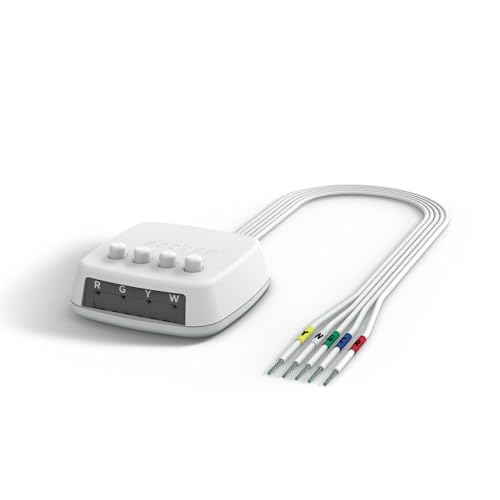
Option 2: Install a C-Wire Adapter
- How it Works: A C-wire adapter (like the Ecobee PEK or Honeywell C-Wire Adapter) mounts inside your furnace cabinet. It combines the G (Fan) and Y (Cooling) signals over a single wire, freeing up one existing wire to act as your dedicated C terminal thermostat line.
- Cost: $20 – $40
- Difficulty: Moderate DIY
- Best For: Homes with only 4 wires ($R, W, Y, G$) where running new wire is too difficult.
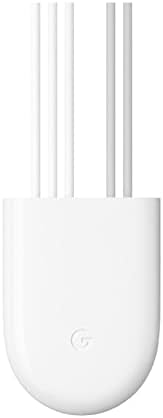
Option 3: Install a Nest Power Connector
- How it Works: Designed specifically for Google Nest devices, the Nest Power Connector attaches directly to your furnace control board. It feeds stable power over existing wires without requiring you to splice fan signals.
- Cost: ~$25
- Difficulty: Moderate DIY
- Best For: Nest thermostat owners with a 4-wire setup.
Option 4: Run a New Thermostat Cable
- How it Works: Pull out the old 4-conductor cable and fish a brand-new 18/5 or 18/8 (18-gauge, 5 or 8-conductor) thermostat wire from the HVAC equipment directly up to the wall location.
- Cost: $15 – $50 (for wire)
- Difficulty: Advanced DIY (requires attic/crawlspace access)
- Best For: Open basement layouts, unfinished drywall, or complete home remodels.
Option 5: Hire an HVAC Professional
- How it Works: An experienced technician evaluates your control board, runs fresh wiring, or installs power modules safely.
- Cost: $150 – $350 (varies by region)
- Difficulty: Zero effort
- Best For: Complex multi-zone systems, older homes, or homeowners uncomfortable working with low-voltage wiring.
READ MORE: Best ecobee Smart Thermostat Review: Essential vs Enhanced vs Premium

C-Wire Adapter vs. Running a New Wire
| Factor | C-Wire Adapter | Running a New Wire |
| Cost | $15–$40 | $100–$300 |
| Difficulty | Easy | Moderate to hard |
| Reliability | Good | Excellent |
| DIY Friendliness | High | Medium |
| Best For | Quick fixes, renters | Permanent, long-term solutions |
| Installation Time | 15–30 minutes | 1–3 hours |
| Long-Term Value | Moderate | High |
Can You Install a C-Wire Yourself?
For many homeowners, yes especially if you’re comfortable with basic tools and following labeled steps.
- Skill level: Beginner to intermediate, depending on wall access.
- Tools needed: Screwdriver, wire strippers, a voltage tester, and possibly a fish tape for running new cable through walls.
- Safety: Always shut off the breaker to your HVAC system first, since even 24V systems can short and damage your control board if wires touch incorrectly.
Mistakes to avoid:
- Mixing up wire colors instead of checking terminal labels
- Forcing a connection into the wrong terminal
- Leaving wires loose in the terminal block
- Not labeling wires before disconnecting the old thermostat
When to call a technician: If you have a heat pump, multi-stage system, or can’t locate any spare wiring, it’s worth having a professional confirm your system’s wiring diagram before you start.
READ MORE: Is a Google Nest Thermostat Worth It? Review, Comparison & Buyer Guide
Common C-Wire Problems
- Loose or corroded connections at the terminal
- Wire installed in the wrong terminal
- Low voltage reaching the thermostat
- A completely dead or unresponsive thermostat
- A shorted wire touching bare metal in the wall
- A blown low-voltage fuse on the control board
- Incorrect wiring after a DIY thermostat swap
- Faulty relays or connections on the HVAC control board
Troubleshooting Smart Thermostat C-Wire Issues
- Confirm the breaker to your HVAC system is on.
- Check the thermostat display for a “no power” or “C-wire required” message.
- Remove the thermostat and check that all wires are firmly seated in their terminals.
- Use a multimeter to test for 24V between the R and C terminals.
- Check the furnace or air handler’s low-voltage fuse — a blown fuse often means a short somewhere in the wiring.
- If using an adapter (like a PEK), confirm it’s wired according to the manufacturer’s diagram.
- If voltage is present but the thermostat still won’t power on, the thermostat itself may be faulty.
Benefits of Having a C-Wire
- Reliable, uninterrupted Wi-Fi connectivity
- Better overall thermostat performance and responsiveness
- Continuous power instead of “power stealing”
- Fewer battery changes (or none at all)
- Improved smart home and voice assistant integration
- Smoother remote control through mobile apps
- Potential energy savings from more accurate scheduling
- Automatic software and firmware updates
C-Wire Myths vs. Facts
| Myth | Fact |
| Every thermostat needs a C-wire | Only most smart thermostats truly need or strongly benefit from one; basic thermostats don’t |
| The C-wire carries high voltage | It carries just 24 volts, the same low-voltage standard as the rest of your HVAC control wiring |
| Every blue wire is a C-wire | Wire color is just a convention — always confirm with the terminal label |
| You can’t install a smart thermostat without a C-wire | Many models work without one using battery power or adapters, just with some trade-offs |
Expert HVAC Tips
- Always photograph your existing wiring before disconnecting anything.
- Label each wire with tape before removal — don’t rely on memory.
- Verify terminal function at the furnace control board, not just the thermostat.
- Use a voltage tester before touching any wire, even at 24V.
- If you find a spare wire, test continuity before assuming it’s usable.
- Don’t force a wire into a terminal that doesn’t match your system’s wiring diagram.
- When in doubt about a heat pump or multi-stage system, consult the installation manual for your exact model.
- Keep the old thermostat’s wiring diagram or a photo in case you need to revert.
- If your adapter kit seems to cause Wi-Fi drops, double-check its wiring against the manufacturer’s guide.
- When replacing an aging system soon, consider having new thermostat cable run at the same time to save labor later.
Final Verdict
If you’re installing a smart thermostat, having a true C-wire is almost always the better long-term choice it gives you consistent power, reliable connectivity, and fewer headaches down the road. Homeowners with basic, non-smart thermostats generally don’t need one at all.
For older homes without a C-wire, an adapter is a reasonable short-term fix, especially for renters or anyone wanting a quick solution. But if you plan to stay in your home for years and want the most dependable setup, running a dedicated new wire or having a professional do it is worth the investment.
When in doubt, especially with heat pumps or multi-stage systems, it’s worth a quick call to a licensed HVAC technician to confirm your system’s wiring before you start swapping thermostats.
Situation Comparison Table
| Situation | Need C-Wire? | Best Solution |
| Basic mechanical thermostat | No | No action needed |
| Nest thermostat, spare wire available | Recommended | Use the spare wire |
| Nest thermostat, no spare wire | Recommended | Nest Power Connector |
| Ecobee thermostat, no spare wire | Recommended | Power Extender Kit (PEK) |
| Honeywell smart thermostat | Often required | C-wire adapter or new wire |
| Emerson Sensi thermostat | Usually not required | Standard install, no C-wire needed |
| Heat pump system | Strongly recommended | Run a dedicated new wire |
| Dual fuel system | Strongly recommended | Professional installation |
| Multi-stage HVAC system | Strongly recommended | Run a dedicated new wire |
| Renting an apartment | Depends on thermostat | C-wire adapter (easy to remove later) |
| Older home, finished walls | Recommended if going smart | C-wire adapter first, new wire if needed |
| New construction or remodel | Yes, install proactively | Run new wire during construction |
Pros and Cons
Pros of Having a C-Wire
- More reliable smart thermostat performance
- Stronger, steadier Wi-Fi connection
- No battery maintenance
- Better long-term compatibility with future smart home upgrades
Cons of Installing a C-Wire
- May require opening walls or hiring a professional
- Added upfront cost compared to using an adapter
- Not always necessary for basic, non-smart thermostats
FAQs
What is the purpose of a C-wire in HVAC?
The C-wire, or common wire, completes the 24-volt power circuit between your HVAC system’s transformer and your thermostat. It provides continuous power so features like Wi-Fi, touchscreens, and smart scheduling can run without interruption.
Can a smart thermostat work without a C-wire?
Yes, many smart thermostats are designed to work without one, using battery power or a technique called power stealing to borrow tiny amounts of electricity from the signal wires.
How do I know if my thermostat has a C-wire?
Turn off your HVAC system’s breaker, then remove your thermostat’s faceplate from the wall. Look at the wiring terminals for one labeled “C.” If it’s empty, check behind the thermostat for an unused wire tucked into the wall opening, since some installers left a spare wire unconnected. You can also check your furnace or air handler’s control board for a labeled C terminal.
What color is a thermostat C-wire?
The C-wire is most commonly blue or black, but color alone isn’t a reliable way to identify it. Wire colors follow a general industry convention, not a strict rule, so an installer may have used whatever wire was available at the time.
Can I install a C-wire myself?
In many cases, yes. If you have access to a spare wire in your existing thermostat cable, connecting it to the C terminals at both ends is a manageable DIY project for most homeowners. Always turn off the breaker first and use a voltage tester before handling any wires.

